Table of Contents▼
In This Article
- My Personal Backup Routine
- The Hard Drive Problem Most DJs Are Ignoring
- The Best Solid State Hard Drives for DJs Right Now
- Samsung T7 Shield (Rugged Edition)
- Samsung T7 (Standard Edition)
- SanDisk Portable SSD
- How to Prepare Your New Drive Before Copying
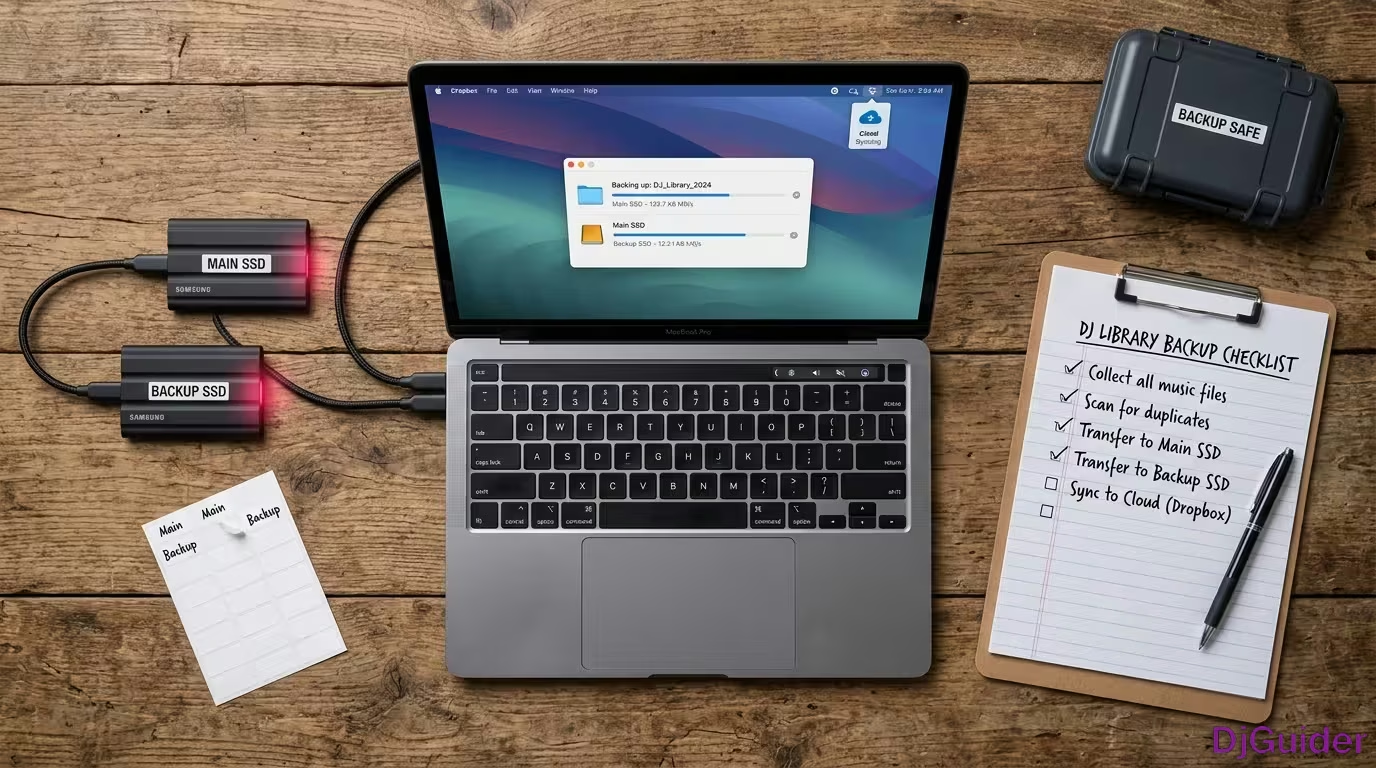
- How to Copy Your Entire Music Library to the New Drive
- DJ Backup Strategies From Working DJs
- DJam: Duplicate External Hard Drives With Regular Pruning
- Goalie: Google Drive and GoodSync Software for Cloud Backup
- Ian Williams: Three Offsite Copies Plus Time Machine
- Jeff Lugman: RAID 1 Portable Drive With Thunderbolt Speed
- DJ Smokey: Safe Deposit Box Storage for Maximum Security
- Aid Sans: Backing Up Your Entire DJ Kit, Not Just Music
- SI House: A Warning About Rekordbox Playlist Recovery
- Trio Higland: External Drive Plus Unlimited Cloud Backup
- DJ Music Backup Methods Compared
- Final Thoughts on DJ Drive Maintenance
Losing your music collection is one of the worst things that can happen to a DJ. These are real backup strategies shared by working DJs, covering everything from external hard drives to cloud storage and offsite solutions.
I can't tell you the amount of times I've heard guys say 'I don't know what to do now, I've lost everything. All of my music is gone.' That is the nightmare scenario you need to avoid. A backup is a very cheap price to pay for an eternity of not being anxious about your hard drive dying.
My Personal Backup Routine
I back up my entire music library to a Western Digital 1TB USB 3.0 drive, available on Amazon for under $60.
I have a regular scheduled backup routine. I have two of them actually. First in December, right after I prune my music library of songs that I don't play anymore, and then the second time is in June the following year.
I make a complete copy of my iTunes music library, because I still use iTunes to organise and manage my music. I make a complete copy of that and then I just paste it on over to this little hard drive.
That's my entire backup process. Super simple, and it works. It helps me sleep better at night knowing that I've got an exact copy of all of my music in case something happens to my laptop.
Back up after pruning your library — December after the year-end cleanup, and June mid-year. A complete copy of your music on a USB drive costs under $60 and helps you sleep better at night.
The Hard Drive Problem Most DJs Are Ignoring
This old school hard drive is still the one I use every single day when I go to the club.
I have to hold it carefully because it's still got the needle and the pins in it. It's a mechanical drive, and those are fragile.
I've also had a solid state hard drive for about two and a half years now, and I still haven't put it into real-world use. That changes today.
I've definitely been noticing that my drive is getting to full capacity, and it's getting slower loading songs. The way I play is very quick — I'm always mixing, always bringing tracks in, sometimes loading a track as I'm hitting a stem.
If that track isn't loaded at the exact perfect time, I'm going to have a little jump and have to figure out how to sync it back up. Sometimes I'll hit it with a little pitch bend just to catch it up. But sometimes it can become a real issue.
Mechanical drives have needles and pins that are fragile. As they get full they get slower — and when you're loading tracks quickly during a mix, that delay can become a real problem. Solid state drives are faster, more durable, and increasingly affordable.
The Best Solid State Hard Drives for DJs Right Now
There are a ton of solid state external hard drives on sale right now, and getting one is the single most important thing you can do.
It's a very cheap price to pay for an eternity of not being anxious about your hard drive dying.
Samsung T7 Shield (Rugged Edition)
The Samsung T7 Shield is the one I personally have. My old Lacy was a rugged hard drive, so I went rugged again — I've had a rugged drive for about 15 years give or take, so I had to stick with that.
The 4TB version is on sale for $299 right now, which is $200 off. That's the one to grab if you want maximum storage.
Samsung T7 (Standard Edition)
If you don't need the rugged casing, the standard Samsung T7 is also a solid option. It's got 31,000 five-star reviews, so it's probably pretty good. This one comes in at $162 for the 2TB.
SanDisk Portable SSD
A lot of the drives I've had over the years have been SanDisk, and I've heard very good reviews about this one. It's $159 for 2TB — a very solid price. If I didn't already have a drive, I would grab this no questions asked.
- Samsung T7 Shield (Rugged, 4TB) — $299, durability + max storage
- Samsung T7 Standard (2TB) — $162, 31k five-star reviews
- SanDisk Portable SSD (2TB) — $159, budget-friendly proven brand
- Rule of thumb — Most DJs don't need more than 2TB if they regularly prune their library
| Drive | Price | Best For |
|---|---|---|
| Samsung T7 Shield (Rugged, 4TB) | $299 (was $499) | DJs who need durability and max storage |
| Samsung T7 Standard (2TB) | $162 | Everyday use, 31k five-star reviews |
| SanDisk Portable SSD (2TB) | $159 | Budget-friendly, proven brand |
How to Prepare Your New Drive Before Copying
Before you copy anything, eject your master drive so there is no chance of making a mistake.
Make sure your main working drive is not plugged in at all. There should be no way you could possibly confuse the two drives during this process.
Once your new drive is plugged in, go through and delete anything you don't need on it. On my new solid state — I'm calling it New Fire — I had one old crate structure from a night I tested it, plus some Samsung system files.
Inside the drive you're going to see a folder called Serato. This is where all of your crates are saved, and this is something really important for you to know.
If you have multiple hard drives, you're going to have this Serato folder on any single drive you've ever brought music into. A lot of times when people are missing music and don't know where it went, it's because they loaded it from a different hard drive and now that file path is missing.
Because I'm starting completely fresh, I'm deleting my old Serato folder. I don't need my old crates, I don't need my old history. We're starting clean.
If you have multiple hard drives, each one has its own Serato folder. A lot of times when people are missing music, it's because they loaded it from a different drive and the file path is now missing. When starting fresh, delete the old Serato folder and begin clean.
How to Copy Your Entire Music Library to the New Drive
Once your new drive is wiped clean, the actual copy process is straightforward.
Grab everything from your master hard drive, copy it, and paste it directly onto the new solid state. That's all there is to it.
In 12 to 24 hours from now, the copy will be complete and your new drive will be an exact replica of your original. Moving forward, your new solid state becomes your day-to-day working drive, and your old drive becomes the backup that stays in your bag at all times.
There's a lot of different ways you can manage your music, but the way I like to do it is hard copies on physical drives. I always have backups, I'm always safe, and I don't have anything I ever need to worry about.
Eject your master drive. Plug in your new drive. Delete the old Serato folder if starting fresh. Copy everything from master to new drive. In 12–24 hours you have an exact replica. New SSD becomes your working drive, old drive becomes your backup in your bag.
DJ Backup Strategies From Working DJs
Working DJs shared their backup methods, and the approaches range from simple duplicate drives to multi-location offsite systems.
DJam: Duplicate External Hard Drives With Regular Pruning
I currently have two external hard drives where I store things in duplicate. One hard drive goes, I immediately buy a new one and copy all the music of the other one on to the new. Over time as things age, I'll replace said hard drives and use new ones. Very systematic.
I also try not to hang on to every piece of music possible. My old school is most important to me, but I have dumped loads of music that I know I'll just never play ever again. There's just no sense in hanging on to anything that isn't timeless in your eyes.
It is really, really important to prune your music library regularly. If you have a track that you haven't played in five years, you're probably not going to play it at your next bar, pub, or even your next wedding gig. May as well delete that and keep your music library up to date.
Goalie: Google Drive and GoodSync Software for Cloud Backup
I use iTunes as well for organising music. I back up two things — first the music library folder itself, and second the iTunes library and all its content.
I use Google Drive and I pay for larger storage space. I also use GoodSync software to back up the files. I do it once a week. That way, even when some tags and properties are modified, it will all be backed up.
I'm going to do it with the Traktor collection and data as well. In the past I used an external hard drive, but I think the cloud is safer.
Ian Williams: Three Offsite Copies Plus Time Machine
Firstly, I have two collections to back up — my DJing collection on my laptop and my master media collection at home. My DJing collection is included on my Time Machine backup at home.
I also keep three extra copies on external USB drives — one backup DJing collection that goes in my gig bag, one that stays at home, and one that's left at work offsite.
My master media collection lives on a 3TB drive at home. This is copied every week using Carbon Copy Cloner to two separate USB drives. One of these stays at home and the other at work, and these two are also rotated every week — the home one goes to work, the work one comes home.
Jeff Lugman: RAID 1 Portable Drive With Thunderbolt Speed
I use a portable drive made by Western Digital that is RAID 1. It has two 2TB drives in one portable chassis. The music on this drive and on my SSD and the Mac is backed up with Time Machine to a different drive as well.
The Western Digital drive is also Thunderbolt, so it's fast enough to use in real time with Serato. No glitches.
DJ Smokey: Safe Deposit Box Storage for Maximum Security
I have two Western Digital 3TB MyBook drives. I use Time Machine to make a full backup every two or three weeks. I keep one drive in another location — a safe deposit box at the local bank.
I rotate them about twice a year. I've also made a small emergency backup on a pen drive.
If you store your hard drives in a bank, it can't get any safer or more secure than that.
Aid Sans: Backing Up Your Entire DJ Kit, Not Just Music
Two laptops with identical music collections, both configured to my controller. External powered hard drive and some good old fashioned CDs. A variety of cables, extra external sound card, extra USB hub, extra cables, extra mic, extra headphones, and another mixer stashed in the car.
The show is going ahead one way or another.
Aid seems to have a backup for everything in his DJ kit — not just his music library, but everything else needed to perform in front of people.
SI House: A Warning About Rekordbox Playlist Recovery
As a Rekordbox user I regularly back up my collection to a pair of USB hard drives using the export feature. Unfortunately I did have a hard drive death on my laptop a few months back and found that Rekordbox is unable to reimport playlists from the external hard drives.
While I was able to salvage my 20,000+ legit MP3s, I lost all my playlists, cue points, and hot keys. They still exist on the USB hard drives, but not in my main collection.
Trio Higland: External Drive Plus Unlimited Cloud Backup
I use one 1TB drive with Time Machine for local backup of my computer, and Backblaze for unlimited cloud backup.
These days, if you want to be really, really secure, you could have an external hard drive with your music and also back up your entire collection over to the cloud. It doesn't really cost a lot to sign up for an account over at Dropbox, Google Drive, or iCloud, as well as any of the other cloud service providers.
It is a worthwhile investment, especially if you spent many, many years building your music collection, pruning them, making sure they're up to date — and you already have all your cue points, all your playlists, and all that other stuff. Especially if you're heavy on using a specific DJ software like Traktor, Serato, Virtual DJ, or Rekordbox. It's a small price to pay in order to sleep better at night.
One DJ reports that Rekordbox was unable to reimport playlists from external hard drives after a laptop failure. While 20,000+ MP3s were salvaged, all playlists, cue points, and hot keys were lost. Test your restoration process before you actually need it.
DJ Music Backup Methods Compared
| DJ | Backup Method | Best For |
|---|---|---|
| Joey (host) | Western Digital 1TB USB 3.0, twice yearly | Simple scheduled routine |
| DJam | Two duplicate external drives, replace when one fails | Systematic hardware rotation |
| Goalie | Google Drive + GoodSync, weekly | Cloud-first with tag preservation |
| Ian Williams | Time Machine + three USB drives rotated offsite | Maximum redundancy |
| Jeff Lugman | RAID 1 portable drive + Time Machine | Fast real-time use with backup |
| DJ Smokey | Two MyBook drives + bank safe deposit box | Secure offsite physical storage |
| Aid Sans | Two laptops + drives + CDs + full kit backup | Full performance redundancy |
| SI House | Rekordbox USB export (playlists at risk) | Music files safe, playlists at risk |
| Trio Higland | 1TB Time Machine + Backblaze cloud | Local and unlimited cloud combined |
Final Thoughts on DJ Drive Maintenance
Treat your gear with respect and it will last you forever.
My old Lacy rugged hard drive has been with me since the dawn of time. It's been to so many parties, so many shows, and it's still in pristine condition. No scratches, no dirt. That's what happens when you take care of your equipment.
Right now I'm actively going through all of my drives inside Serato, searching for songs I have a bunch of remixes of that I've never played, and just deleting everything. Getting it tight, getting it clean.
Get yourself a solid state hard drive, back up your drive, and keep that backup in your bag every single time you walk out the door.
I literally have like four backups of my drive at any given time. Right now my solid state is acting as one backup, and I always have it in my bag. Once the Lacy becomes my backup drive, it's still going to be in my bag at all times.
You should always have a backup of your music somewhere. Even if you keep your music on your laptop, you never know what happens. You have to have a backup. This is so, so important.
Get yourself a solid state hard drive, back up your drive, and keep that backup in your bag every single time you walk out the door. I have four backups at any given time. You should always have a backup somewhere — this is so, so important.