
Table of Contents▼
In This Article
- What They Have in Common
- Design and Build
- XDJ-AZ: Club Standard
- Opus Quad: Striking and Different
- Screens and Display
- Microphone Inputs
- Load Buttons and Channel Selection
- XDJ-AZ Exclusive Features
- Wireless Headphones via Sonic Link
- ProDJ Link for External Multiplayers
- Beatport Streaming
- Gate Cue Mode
- Effects
- Hot Cues and Pads
- Opus Quad Exclusive Features
- Zone Output for Mobile DJs
- XY Pad for Beat Effects
- Built-In Smooth Echo
- Hot Cue Layout
- Jog Wheels
- Mixer Settings and EQ
- USB Connectivity
- Four-Channel Mixing: Sync, Stems, and Layering
- The Future: An MP4-Friendly All-in-One
- Which One Should You Choose?
- Full Comparison Tables
- At a Glance: What to Choose
- Features Deep Dive
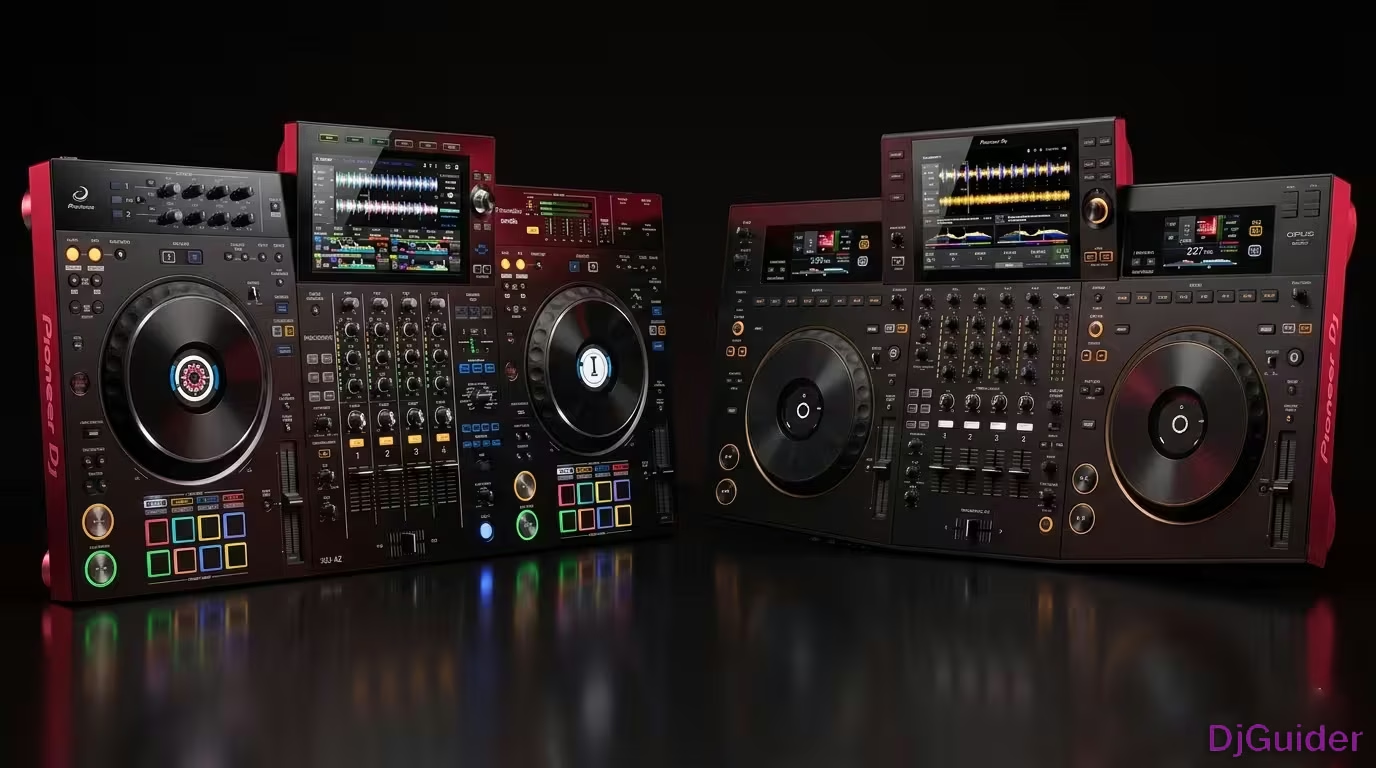
The XDJ-AZ and Opus Quad are two very different four-channel standalone DJ systems from the same company. The XDJ-AZ is a club-style controller with CDJ-3000 jog wheels, ProDJ Link for external decks, Beatport streaming, wireless Sonic Link headphones, and Gate Cue mode. The Opus Quad targets high-end mobile DJs with a striking curved design, Zone output for multi-room audio, XY effects pad, built-in smooth echo, and separate jog wheel screens. They cost the same — choose based on your DJ style.
The XDJ-AZ and the Opus Quad are two of the biggest standalone DJ controllers on the market right now. Both made by Alpha Theta, both four-channel, both work with Rekordbox and Serato — on paper they look very similar. In practice, they are built for two very different types of DJ.
The XDJ-AZ is a lot more like the industry club standard CDJ and mixer setup you would expect to see in a nightclub. It's the XDJ-XZ on steroids — a shrunken version of an A9 mixer and two CDJ-3000 multiplayers all put into one box, selling for way under half the price of that separate setup.
The Opus Quad is more akin to the professional DJ who still wants the usability and functionality of an all-in-one console but isn't really tied to the CDJ world. It's a high-end mobile DJ device — something that looks visually stunning and very different from the classic DJ gear look. It's for prestigious home users and trendy venues that want something that just looks cooler.
This guide breaks down every difference so you can decide which one is right for you.
What They Have in Common
Both the XDJ-AZ and the Opus Quad are four-channel standalone DJ systems made by the same company — Alpha Theta.
They both work with Rekordbox and Serato. They've both got the same inputs and outputs, and they both have the same really nice big screens.
Both units have USB-C output for your laptop. Both have Bluetooth input, which is useful as a backup if you've forgotten an RCA lead or a guest wants to play a track from their phone. Neither is something to rely on day-to-day, but as a backup it makes sense.
Both can connect to Cloud Direct Play, which allows you to get your own music via the Rekordbox Cloud across the internet. So you can access your own library from either unit without a USB stick.
Once you have put all of your tracks through the appropriate software, there's actually no real need to plug in a laptop. That changes if you're doing video DJ setups and need to run MP4s, of course — and that's something neither unit handles natively on its own screens.
Design and Build
XDJ-AZ: Club Standard
The XDJ-AZ looks and feels like club gear. The layout is familiar to anyone who's used CDJs and a club mixer. It's designed for club-style DJs who maybe want to have it as part of a bigger setup. The jog wheels are the exact same jog wheels that you get on the CDJ-3000s — a major selling point.
Opus Quad: Striking and Different
Like it or hate it, this is a stunning design. The colours are based around orange and white. The screens in the middle of the jog wheels show you symbolic information, and all of the data that is sometimes in the jog wheels has been pushed up to the central screen including the artwork. You've got a plethora of screens and a striking curved look to the whole thing.
It's also got a wood effect around the edges, which is very different from clubs but something that some people really like. It looks a little bit more professional in certain settings, whereas the AZ looks more industry standard.
Pro tip: When you've got either unit in front of you on a suitable DJ setup, people aren't going to think anything of it. 99% of the public are interested in having a good night and listening to good music. They wouldn't know the difference between an Opus Quad and a DDJ-400. So long as the DJ is doing a good job playing good music, they don't care.
Screens and Display
The Opus Quad has three screens while the AZ uses one large central touchscreen.
With the Opus Quad, you have a touchscreen in the middle and above the jog wheels you have designated small screens for each designated side. With the AZ, you've just got the one big touchscreen in front.
On the AZ screen, you can see four channels displayed at the bottom, and in the settings you can choose to show four channels or just two.
Microphone Inputs
Both offer microphone inputs, but the layout differs.
With the Opus Quad, you have a microphone input on the front and one on the back. For ease of access for the mobile DJ, you've got your trim, bass, mid and treble, and a small switch to turn the microphone on and off.
With the AZ, very similar to the XZ, top left hand corner you have your two channels for your microphones.
Load Buttons and Channel Selection
The Opus Quad has two load buttons for channels one and three, and two and four, whereas the AZ has four separate buttons.
Personally, I prefer the four separate buttons so you can see exactly what you're loading onto. Above the jog wheel on the AZ, we have two buttons for channel two and four on the right, and on the left for channel three and one.
Similarly with the Opus Quad, the load buttons sit next to the small screens for two and four, and one and three.
XDJ-AZ Exclusive Features
Wireless Headphones via Sonic Link
The XDJ-AZ supports Alpha Theta Sonic Link headphones — the HDJ-F10, with F standing for freedom because there ain't no wire. They go directly into this unit, and there's a button around the front that you press and they'll automatically connect with it.
You don't need to have a cable with your headphones. It's called Sonic, and it is something completely unique at the time of recording to this unit.
Now, if like me you're a keen mixing DJ and you mix solely by ear, I've yet to try the Sonic Link and see how accurate that really is. I'm the sort of DJ where you can sense exactly if it's a fraction out, too fast, too slow. So the jury is still out on wireless latency for beatmatching by ear.
ProDJ Link for External Multiplayers
Around the back they're actually both quite similar — you've got all the balanced and unbalanced outputs, a booth output, inputs for two microphones, and they both have an ethernet socket. But there's a big difference here.
On the XDJ-AZ, if you put an ethernet switch on here or put this into a bigger ethernet network, you can use ProDJ Link to connect up to two CDJ-3000s as an example. That means you can use physical decks alongside the decks given to you here to control decks three and four of the unit.
That's not possible on the Opus Quad. The Opus Quad's got the same socket around the back but it doesn't work with ProDJ Link. It's designed to be a complete system — you're not meant to add extra decks to it.
Beatport Streaming
This unit has Beatport as a selectable source, which means you can use Beatport's library to stream music into it. It's a club standard controller and therefore you're going to want club music in there, and if you want a streaming service Beatport is the one that makes sense.
The curiosity is that you don't get that on the Opus Quad at all. They did say they were adding it to the Opus Quad and told me Autumn 2024 — well it now is Autumn 2024, so whether that happens or not remains to be seen. But at the time of recording there are no music streaming services in the Opus Quad.
Gate Cue Mode
By pressing this button on the XDJ-AZ you switch into Gate Cue mode. Gate Cue is turning the cues into the same way of working that you get on most DJ controllers and most DJ software — if the track's playing and you press a cue pad it will play from that cue pad, but if the track's paused it will pause at that cue pad.
Until now on all gear like this from Pioneer DJ / Alpha Theta you haven't had that option, and some DJs have really missed it. That's on this one but it isn't on the Opus Quad.
Effects
The AZ has noticeably more effects available, with a layout much more akin to a standalone club mixer. On the right hand side of the AZ, we've got a lot more interesting effects. You can split through the channels with low, mid, and high, similarly to the standalone mixers themselves.
One effect I do like is the triplet roll. So instead of it being bam, bam, bam, bam, it's almost like a ba-ba-ba-ba-bam. You get a roll inside the roll.
The colour sound effects dials on the AZ are more akin to the separate mixer you would have in a nightclub.
Hot Cues and Pads
On the AZ, you've got your hot cues, beat loop, slip loop, and beat jump right in front of the jog wheels — laid out like a controller, with pads that give you full trigger control.
Opus Quad Exclusive Features
Zone Output for Mobile DJs
This is where the Opus Quad stands clearly above the AZ, especially for the mobile DJ.
The Opus Quad has a separate XLR output for a second room. You can utilise it to play tracks in another room while you're playing to a completely different crowd in the room that you're in.
That is excellent if you've got a lounge where people are walking in, having canapés and drinks before they come into the main event. With the AZ, you've got your master out, your booth on quarter inch jack, and RCA out — same as the Opus Quad — but there is no second room output.
A Zone output lets you push off Channel 4 and have Channel 4 playing a playlist in the second room, while the main room has your other channels to DJ with as well.
XY Pad for Beat Effects
One nice feature on here that isn't on the AZ is the beat effects have an XY pad, which gives you some fun control of a combination of a filter and an effect that just isn't on the other unit.
Built-In Smooth Echo
This one also has a built-in smooth echo — an echo out — which is easier to trigger smoothly than triggering a similar effect on the AZ. It's something that didn't make it across into the AZ.
Hot Cue Layout
Curiously, the hot cues are at the top of the jog wheel on the Opus Quad, which is more like the CDJ-3000 layout. They only do cues and loops here, although it is possible to duplicate most of the functions that go on on the pads on the AZ using other controls on the Opus Quad.
Jog Wheels
The jog wheels on the Opus Quad are the more mechanical sounding and feeling CDJ-2000 jog wheels, rather than the CDJ-3000 style found on the AZ. The Opus Quad has a slight variation in the look of the outside of the jog wheel compared to the AZ.
Mixer Settings and EQ
Both units let you access a full mixer settings menu, covering everything from fader curves to deck inputs. You can set channel fader curve, set the curve on the crossfade, set the deck for line, phono, or Bluetooth. You can set the EQ, the headphone level, mic settings, and also record settings.
For the deck inputs, on channel 4 on the right and channel 3 on the left, you can select deck, line, phono, or Bluetooth.
On the Opus Quad, it's important to understand how the crossfade engages depending on which channel you're on. If you think something's going wrong and you can't understand why the crossfade isn't working, just make sure you are on the correct channel. You can hit through to disengage the crossfade, go to B, and move through.
The back of the Opus Quad is very similar to the back of the AZ for external inputs. You've got two RCA inputs, and you can plug into those either a CDJ or a vinyl turntable for channel 4 and channel 3. Both handle line and phono inputs identically.
USB Connectivity
Both offer USB connections, but there are some differences in layout.
The Opus Quad has two USBs on the top and another USB at the back. The AZ also has two USBs. However, the output for your laptop on both units is USB-C.
With a normal USB, you felt as though it was solid — it clicked almost into place. The USB-C tends to slide in, and I just have this feeling in the back of my mind: is it going to pull out?
Four-Channel Mixing: Sync, Stems, and Layering
Both units fully support four-channel mixing. Most DJs mix two channels, but if you're into layering tracks, stems, or using sync to manage multiple decks, both the Opus Quad and the AZ can handle it.
I'm old school. I like to use my ears. That means if I do a mix, I'm 99 percent of the time just doing two channels. But there are DJs out there who would of course like to mix four channels and there's nothing wrong with that.
If you're fantastic at mixing by ear, then of course go for it. If you can't do that, that's when you will use the sync function, and if you've got sync engaged then you can clearly see where your tracks are. My only advice there is don't overdo it.
A great way to approach it is to download tracks where maybe one track is just a bass line with a slight beat in the background for tempo. The next track could be a good solid beat. The third could be an acapella and the fourth a melody.
If you've got the likes of stems, then of course you can separate on the full four channels. Really nice touch on both the Opus Quad and the AZ.
The Future: An MP4-Friendly All-in-One
What is missing in the likes of the AZ is an all-in-one controller that is suitable by itself to play MP4s. Imagine small screens with a tiny window showing what the MP4 is playing, so you're ready to play and you can actually mix the MP4 on the screen itself. That would alleviate the fact of you having to have the laptop.
I'm looking forward to the time when we have a controller like this, and I'm sure we will.
Which One Should You Choose?
Both units are exactly the same price, so it really comes down to personal preference.
If you're a mobile DJ who wants something that does the job, that's not too all over the place, and you want to look professional without too much going on in front of you, then the Opus Quad is for you. The Zone output alone is a game-changer for multi-room events.
On the other hand, if you're more of a mixing DJ who wants tactile functionality — you want to be seen moving, touching, turning, pressing — then 100% the AZ is for you. The CDJ-3000 jog wheels, ProDJ Link for external decks, Beatport streaming, wireless Sonic Link headphones, and Gate Cue mode make it the stronger option for club-focused DJs.
If you want the wireless headphones and Beatport built in at the moment, those are the biggest things you get on the AZ that you don't get on the Opus Quad. But if you'd prefer the looks and feel of the Opus Quad, the XY effects and the Zone output, and you don't mind some of the things it hasn't got, then the Opus Quad is probably the better choice for you.
The XDJ-AZ is definitely the newer of the two units. So if you're trying to future-proof your purchase, that one would probably make more sense.
Full Comparison Tables
At a Glance: What to Choose
| Factor | XDJ-AZ | Opus Quad |
|---|---|---|
| Target User | Club and general DJs | High-end mobile DJs and prestige venues |
| Design Style | Classic club gear look | Striking curved design with wood effect |
| Jog Wheels | CDJ-3000 style | CDJ-2000 style (more mechanical feel) |
| Best for | Club-style and tactile mixing DJs | Mobile DJs, multi-room events |
Features Deep Dive
| Feature | XDJ-AZ | Opus Quad |
|---|---|---|
| Overall style | Club standard CDJ-style layout | Professional all-in-one console |
| Screens | One large central touchscreen | Central touchscreen + 2 small jog screens |
| Wireless Headphones | Yes — Sonic Link HDJ-F10 | No |
| ProDJ Link (external decks) | Yes — up to 2 CDJ-3000s | No |
| Beatport Streaming | Yes | Not at time of recording |
| Cloud Direct Play | Yes | Yes |
| Gate Cue Mode | Yes | No |
| Mic inputs | Top left, two channels | Front and back |
| Load buttons | Four separate individual buttons | Two shared buttons (1&3, 2&4) |
| USB ports | Two top (USB-C to laptop) | Two top + one rear (USB-C to laptop) |
| Zone output (second room) | No | Yes — separate XLR output |
| Effects | Expanded, including triplet roll | Standard, plus XY pad and smooth echo |
| XY Effects Pad | No | Yes |
| Built-In Smooth Echo | No | Yes |
| Bluetooth input | Yes, plus Sonic Link speaker output | Yes |
| Hot cue position | Pads in front of jog wheels | Buttons above jog wheels (CDJ-3000 style) |
| Jog wheel style | Club CDJ-3000 standard | More mechanical CDJ-2000 feel |
| Price | Same | Same |