
Table of Contents▼
In This Article
- The Main Difference Between These Two Controllers
- Mixer Section Layout Compared
- Performance Pads
- Software Compatibility
- EQ and Effects Layout
- Play, Pause, and Jog Wheel Placement
- Jog Wheel Size
- Physical Size and Finish Comparison
- Looping Controls
- Inputs, Outputs, and Connections
- DDJ Rev1 Rear Panel
- DDJ FLX4 Rear Panel
- Bluetooth MIDI — FLX4 Exclusive
- Beginner-Friendly Features: "Cheater" Features That Help You Grow
- Build Quality and Internal Components
- Which Controller Should You Buy?
- Summary Comparison Tables
The Main Difference Between These Two Controllers
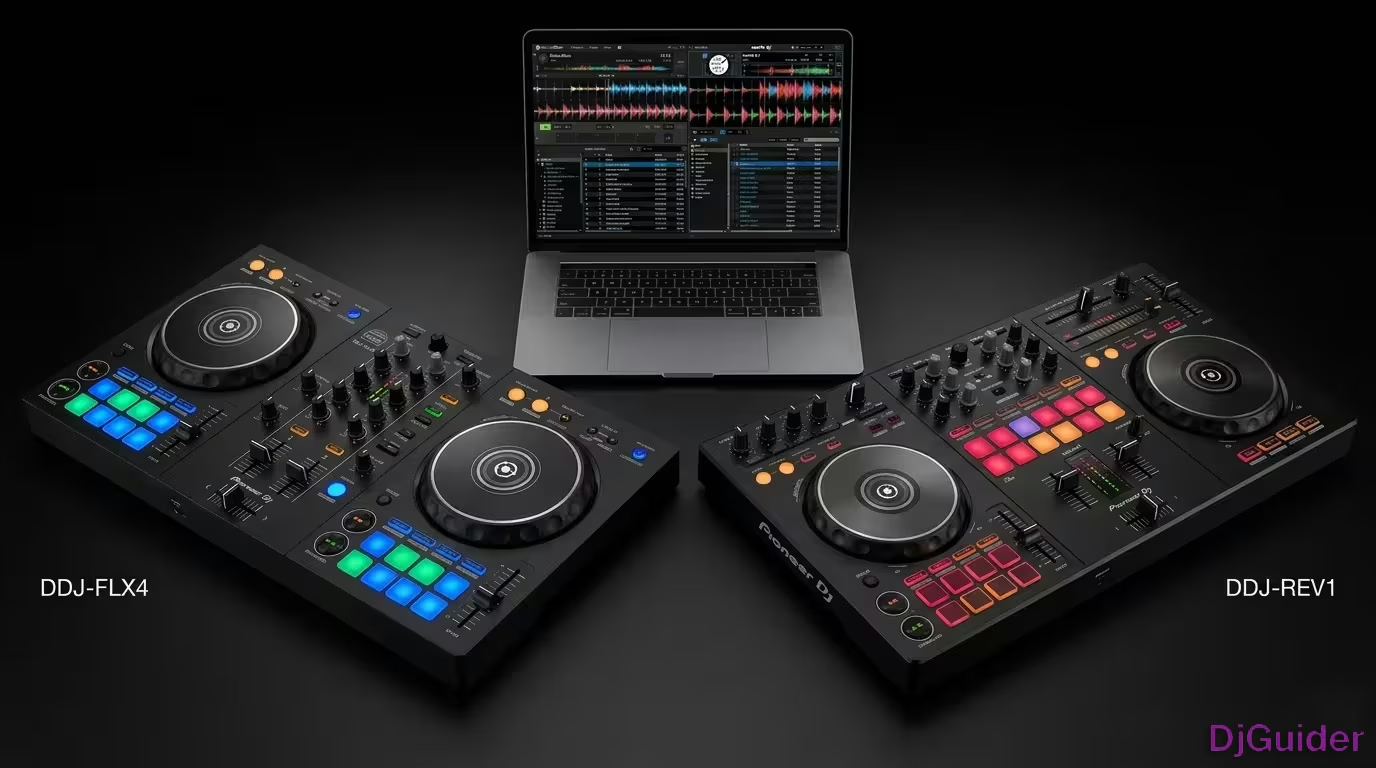
The most obvious difference between the DDJ Rev1 and the DDJ FLX4 is the layout.
The DDJ Rev1 is laid out in a battle style. The DDJ FLX4 is laid out in a club style.
Battle style is favoured by turntable enthusiasts. It's when you turn a turntable the other way around, so the pitch sliders are at the top on the Rev1. On the FLX4, the pitch sliders are down at the bottom, which is where you'd find them on a CDJ.
The DDJ Rev1 and DDJ FLX4 take slightly different approaches to DJing, but they will ultimately accomplish the same thing. The Rev1 is built more around a battle style orientation, mimicking turntables in the scratch position. The FLX4 takes a more traditional Pioneer mixer approach.
Mixer Section Layout Compared
The mixer section on each controller reflects its intended DJ style.
On the Rev1, the mixer is laid out like a battle scratch mixer — similar to the DJM-S7, S11, or S9. The performance pads sit above the channel faders.
On the FLX4, the performance pads are underneath the jog wheels, which is the layout you see on pretty much every DJ controller on the market — not just Pioneer DJ.
Performance Pads
Both controllers give you eight performance pads per channel, and the pads are the same size — a nice rubbery feel.
The Rev1 has some specific pad modes that didn't appear on any other controllers at the time, including Tracking and Trans.
The FLX4 also has its own exclusive features not seen on other controllers — the Smart Effects and the Smart Fader.
Software Compatibility
This is one of the bigger differences between these two controllers.
The Rev1 is only officially compatible with Serato DJ Pro and Serato DJ Lite. You have to pay to upgrade to Serato DJ Pro, which is always recommended.
The FLX4 has dual compatibility with both rekordbox and Serato. The Rev1 has already been MIDI mapped to other software, and the FLX4 will likely follow, but officially those are the supported platforms for each.
The FLX4 supports both rekordbox and Serato, giving you more flexibility. If you think rekordbox is in your future — which it likely is if you aspire to play in clubs — the FLX4 is a great place to start.
EQ and Effects Layout
The EQ and effects sections mirror the overall club vs battle philosophy of each controller.
On the Rev1, the three-band EQ sits up top with the trim and filter knob — exactly how you'd find it on a battle mixer. On the FLX4, it runs in a row: trim, high, mid, low EQ, then filter underneath — more like a club-style mixer.
Effects on the FLX4 are down the side, just like on a club mixer. On the Rev1, effects are triggered up top using the paddle, which is how you trigger effects on pretty much all battle mixers on the market.
The Rev1 uses paddle-style effects — you engage them with the paddles, similar to a DJM-S series mixer. The FLX4 uses an assignable button and dial approach, more like a classic Pioneer club mixer. In either case, these devices are training you for a future with other Pioneer devices.
Play, Pause, and Jog Wheel Placement
Play and pause placement follows the same pattern — club setup on the FLX4, turntable-style on the Rev1.
On the FLX4, play and pause are down at the bottom, just like on a CDJ. On the Rev1, they're positioned more like a turntable layout.
The cue and master cue follow the same logic. On the Rev1 they're spread out in battle mixer fashion. On the FLX4 they sit above the channels and up top, exactly where you'd find them on a club-style mixer.
Jog Wheel Size
The Rev1 has noticeably bigger jog wheels than the FLX4.
Measured with a tape measure: the Rev1 jogs are 6.5 inches and the FLX4 jogs are 5.5 inches — a full inch difference.
With the Rev1 leaning more towards scratching and turntablism, bigger jog wheels make complete sense. The FLX4 still has good-sized jogs, and with the indents around the side on both controllers, learning on either will make you feel completely at home when you hop on a CDJ.
Physical Size and Finish Comparison
The Rev1 is slightly larger than the FLX4, mostly to accommodate the bigger jog wheels.
| Controller | Width | Depth | Height | Finish |
|---|---|---|---|---|
| DDJ Rev1 | 53 inches | ~25 inches | ~4 inches | Glossy |
| DDJ FLX4 | 48 inches | ~27 inches | ~4 inches | Matte |
The mixing section on the Rev1 is also a little more spread out compared to the FLX4. The matte finish on the FLX4 helps mask fingerprints, which is a personal preference worth noting.
Looping Controls
The FLX4 has slightly more emphasis on looping. You have your in and out points with adjustment, an immediate four-beat loop engagement, auto loop controls, and the ability to double loops. In either case you can also use the pads to engage auto loops.
Inputs, Outputs, and Connections
Both controllers share some I/O similarities but differ on connection type.
DDJ Rev1 Rear Panel
- USB-B connection
- RCA Master outputs
- Unbalanced mic input with level control
- Kensington lock
DDJ FLX4 Rear Panel
- Two USB-C connections
- RCA Master outputs
- Mic input with attenuation control
- Mono/stereo adjustment for Android
- Kensington lock
Both have a single RCA master out, neither has a booth out, and both have a single quarter-inch microphone input with volume control on the back.
The FLX4 also has its own dedicated mic level control on the unit itself. Within rekordbox, the FLX4 gives you microphone effects and a three-band EQ for the mic — some really cool stuff.
On both controllers you can route the microphone into the software, which means when you're recording in Serato DJ Pro or rekordbox, or when you're live streaming, your microphone goes into the software and out of the master rather than directly out of the RCA master on the controller.
The dual USB-C connections speak to the flexibility of the FLX4. An update to the rekordbox mobile app was planned to work with the FLX4, including Bluetooth connectivity. That would turn the FLX4 into almost like a pseudo-standalone device — because even though it isn't really standalone, you always have your phone on you anyway.
Bluetooth MIDI — FLX4 Exclusive
The FLX4 has Bluetooth MIDI built in, which the Rev1 does not have.
This allows you to connect the FLX4 directly to your phone or tablet via the rekordbox app — both iOS and Android. That is a really cool feature that gives the FLX4 a meaningful advantage for mobile use.
Beginner-Friendly Features: "Cheater" Features That Help You Grow
Both controllers hold your hand in slightly different ways to help beginners sound good right away.
The FLX4 uses a feature called Smart Fader. As you move the crossfader back and forth, it automatically adjusts things like BPM and EQ to help you do a transition. It slowly changes the volume and EQ of the track as you slide over, then adds an echo-out effect once you hit the edge.
Smart Fader also handles tracks with wildly different BPMs — say 88 versus 140 — making those transitions more manageable. There is also the Smart CFX feature, which chains effects together with some fun results.
The Rev1 has its own equivalent. It includes features that automatically cut the crossfader and make it sound like you are a little better at scratching.
The idea from Pioneer is that if you're new to this and you want to start making sounds that sound good right away, these will help you do that. But they will also give you room to grow into the DJ that you ultimately want to be.
Build Quality and Internal Components
The general build quality and feel of both controllers is very similar, which is exactly what you'd expect.
There is going to be a lot of part sharing here. These are probably very much the same devices on the inside. They are just different layouts for different paths within DJing.
The Rev1 leans toward scratching and hip-hop style DJing. The FLX4 leans toward dance music, club, and festival scenes. In either case, you really cannot go wrong.
The Rev1 leans toward scratching and hip-hop style DJing. The FLX4 leans toward dance music, club, and festival scenes. In either case, you really cannot go wrong. They are very much the same devices on the inside — just different layouts for different paths within DJing.
Which Controller Should You Buy?
The right controller depends entirely on what style of DJ you want to become.
The Rev1 is laid out in battle mode, making it a really good entry-level controller for an open format DJ who wants to progress into turntables, battle mixing, turntablism, and scratching. The FLX4, like the DDJ-400, is laid out like a club mixer. If you learn on this and then go and play on two CDJs and a four-channel 900 Nexus 2 mixer, you are going to feel right at home because it's laid out in exactly the same way.
That said, you don't have to play hip-hop or be a scratch DJ on the Rev1. You don't have to avoid scratching just because you own the FLX4. You can play whatever genre you want on either of these controllers. It's just that the layouts represent two different styles of DJ setups.
You don't have to play hip-hop or be a scratch DJ on the Rev1. You don't have to avoid scratching just because you own the FLX4. You can play whatever genre you want on either of these controllers. Choose based on the layout and software you want to grow into.
Even though the philosophies are slightly different, you're not going to get one and think "I really should have got the other one." They're basically going to be doing the same kind of thing.
Summary Comparison Tables
| Feature | DDJ Rev1 | DDJ FLX4 |
|---|---|---|
| Layout Style | Battle / Scratch | Club / CDJ |
| Software | Serato only | rekordbox + Serato |
| Jog Size | 6.5 inches | 5.5 inches |
| Finish | Glossy | Matte |
| USB Connection | USB-B | Dual USB-C |
| Bluetooth MIDI | No | Yes |
| Effects Style | Paddle-engaged (DJM-S style) | Assignable button + dial (mixer style) |
| Pitch Fader Position | Top (battle position) | Side (club position) |
| Beginner Feature | Auto crossfader cut for scratching | Smart Fader + Smart CFX |
| Mobile App Support | No | Yes, via Bluetooth (rekordbox) |
| Best For | Scratching, turntablism, hip-hop DJing | Dance music, club, festival DJing, CDJ progression |