Table of Contents▼
In This Article
- The Only Four Things You Actually Need to Start DJing
- Starting With DJ Apps (Free to Paid)
- 1. U DJ Mixer — Best Free App for Beginners
- 2. Traktor DJ 2 — Best Free Professional-Feeling App
- 3. edjing Mix — Best Paid App for Aspiring Professional DJs
- 4. Cross DJ — Best Paid App for Small to Medium Gigs
- 5. DJ Pro — Best DJ App Overall for Serious DJs
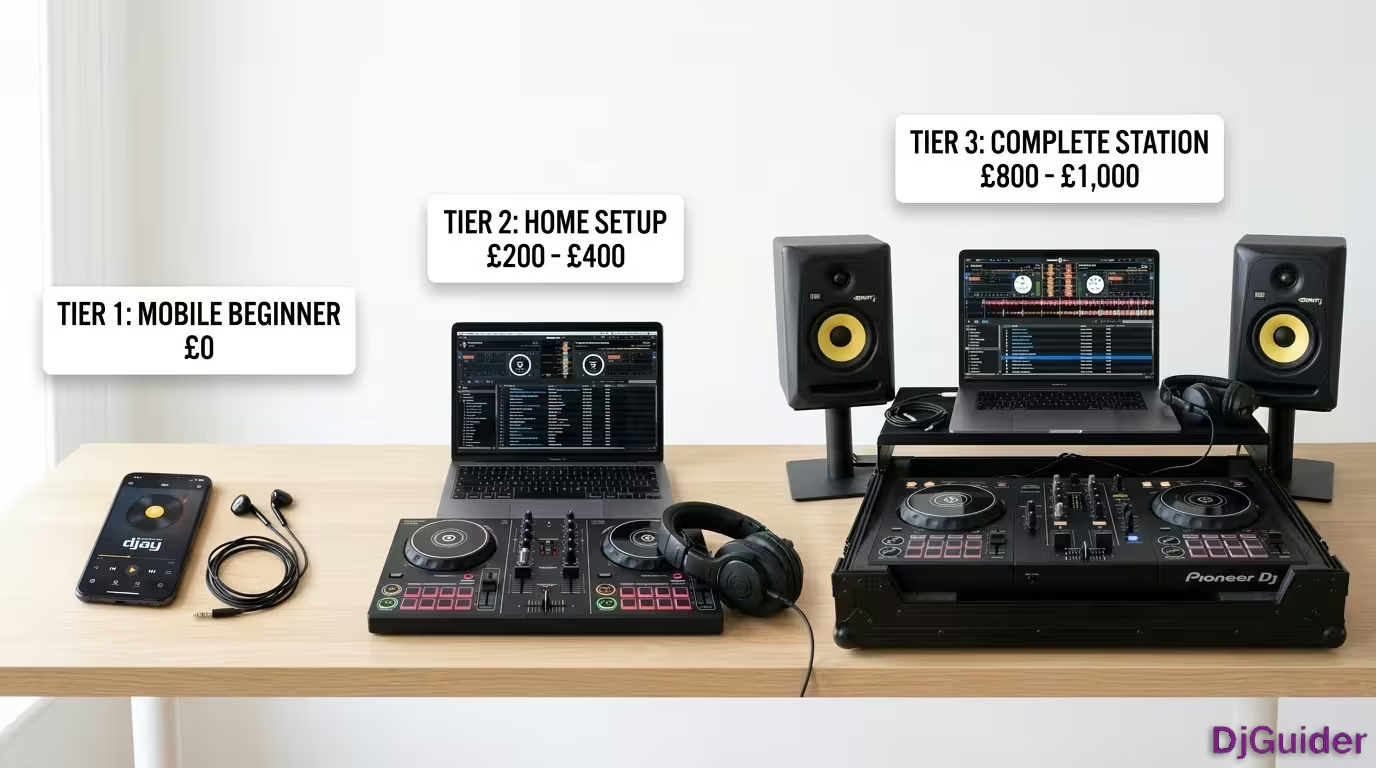
- Beginner DJ Setup: £200 to £300
- Mid-Range DJ Setup: £500 to £600
- Upgraded DJ Setup: £700 to £1,000
- Do You Even Need a Full Setup to Start?
- Where to Get Your DJ Music
- Hidden Costs to Watch Out For
- Full DJ Setup Cost Breakdown
You can actually start DJing right now for free. If you've got a phone, a tablet, or a laptop, you can download an app like DJ Pro, Serato DJ Lite, or Virtual DJ, load in some music that you already have, or a streaming service, and just start to have a play around.
So yes, you can start for free. But if you actually want to learn properly and sound good, you'll eventually need some sort of setup. And the reality is you can still get started for less than the price of a night out.
If you've got a phone, tablet, or laptop, download an app like DJ Pro, Serato DJ Lite, or Virtual DJ and start playing around. Free to start, and you can build your setup over time.
The Only Four Things You Actually Need to Start DJing
To start DJing, you only need four things: a controller, headphones, speakers, and music.
Honestly, you don't even need all of that stuff on day one. A lot of beginners start with just a controller and a pair of headphones, and then build out from there.
This is really important because most beginners waste money straight away buying things that they don't actually need.
- Controller — or an app on your phone/tablet
- Headphones — wired only, any pair works to start
- Speakers — anything you already own is fine initially
- Music — streaming service or record pool
Starting With DJ Apps (Free to Paid)
There are so many DJ apps to choose from, but in 2026, there are only a few that are actually worth downloading.
Every single one of them was downloaded and tested, so you don't have to. These are the five best DJ apps to start DJing with. Some of them are free and some of them require a subscription.
1. U DJ Mixer — Best Free App for Beginners
The U DJ Mixer app is 100% free and has just recently been updated.
This app is for someone that just wants to start DJing. They don't plan on doing it as a career or doing professional gigs like weddings or festivals, but maybe just DJ for their friends and family and just have fun on their phone or their iPad.
This app has pretty much everything you need to start DJing. Right now there are no streaming services, but it says in the near future we will get Beatport and Beat Source, which will have most of the music that you would want. So you just have to pay a subscription for Beatport or Beat Source and then you can DJ with this app completely free.
For now you could use samples up to like two minutes of the song. You just download the app and you've got songs that you could use for free. It has jog wheels, and the jog wheels are pretty good.
It has a play button, some effects, four hot cues, and a mixer. The mixer doesn't have all of the very advanced features that some of the other apps have. But if you're just starting out and you don't want to spend any money, check out the U DJ Mixer app.
2. Traktor DJ 2 — Best Free Professional-Feeling App
Traktor DJ 2 is free and is a lot more of a professional DJ app than U DJ Mixer.
This app is for new DJs or DJs that used other equipment and want to start DJing on the iPad. They don't want to spend any money on subscriptions, but they still want a professional look and feel. They want to get used to professional DJing on a DJ app.
The only downside is this app is no longer being updated. It hasn't been updated in many years. So it's not going to have the most advanced features, but it has everything that you will need.
It includes integration with a streaming service, and that streaming service is SoundCloud. If you pay for the SoundCloud subscription, you could DJ with millions of songs. It also has music that's on your device, and they give you some music for free.
It has all of the basic professional features. You've got your volume slider, you could use a headphone splitter for pre-cueing, and you've got your lows, mids, and highs. It has a BPM slider and pretty good jog wheels.
It doesn't have stems. It doesn't have all of the advanced features. No video mixing. But if you want to DJ with a professional feeling app, definitely check out the Traktor DJ app — it's free, you've got nothing to lose.
3. edjing Mix — Best Paid App for Aspiring Professional DJs
edjing Mix is for someone that wants to start DJing professionally and plans on doing gigs.
This app costs $9.99 per week, or less if you sign up for a longer plan. It has more controllers that are integrated and it's going to look very professional, very old school, very cool looking.
It has pretty much every streaming service integrated with DJing besides Spotify. So you have:
- Tidal
- SoundCloud
- Beatport
- Beat Source
- Music on your device
This app has professional features like smart EQs. You could instantly make acapellas, instantly make instrumentals, and you could isolate the different stems. It has more effects and you can use two effects at the same time.
You have your loops and up to eight hot cues. The jog wheels are really big, but the only thing is when you open these features, you lose your jog wheel. It has waveforms, automix, and you could record.
You could also change the skins. If you have the paid subscription, you can have different skins, which is really cool. So this is edjing Mix — one of the best DJ apps, but it's going to be a little expensive.
4. Cross DJ — Best Paid App for Small to Medium Gigs
Cross DJ recently just did a huge update, and it looks really cool.
This app is for someone who is going to take DJing seriously and plans on possibly doing medium to small gigs. You have your jog wheels, your levels in the middle, and the difference is you could do a lot more stuff at the same time. You have your EQs without getting rid of your jog wheels, your effects, and a sampler.
You could use stems, you could separate the vocals and instrumentals. It has a large list of effects. It has a looper and a pretty big sampler with different packs.
You can open up a waveform view if you're used to DJing with apps that are more waveform heavy than jog wheels. You could also use the waveforms as jog wheels. Cross DJ has more features than edjing Mix and you can do more with it.
5. DJ Pro — Best DJ App Overall for Serious DJs
DJ Pro is for someone that plans on taking DJing very seriously and wants the most advanced features.
This app lets you use any type of MIDI device. Basically any MIDI device, old or new, you could plug in and start DJing with. Most of them are pre-mapped, but if they're not, you may have to map it yourself.
You could use headphones for pre-cueing. It's very important to do a lot of stuff at the same time when you're DJing, and DJ Pro has got it down to a science. In Pro view mode, you have waveforms, jog wheels, mixer in the middle, levels, volume slider, and effects — all usable at the same time.
What separates this DJ app from the other ones is it has an amazing video mixing mode. You can mix with the visualizer or you could load up music videos right from Tidal with the Tidal streaming service. They have music videos and you can start DJing with music videos.
- U DJ Mixer — Free, perfect for complete beginners
- Traktor DJ 2 — Free, professional feel with SoundCloud
- edjing Mix — $9.99/week, stems and 8 hot cues for aspiring pros
- Cross DJ — Paid, most features, great for small to medium gigs
- DJ Pro — Paid, video mixing, MIDI support, the most advanced
| App | Cost | Best For | Key Features |
|---|---|---|---|
| U DJ Mixer | Free | Complete beginners | Jog wheels, 4 hot cues, basic effects |
| Traktor DJ 2 | Free | New DJs wanting a professional feel | SoundCloud integration, EQ, headphone splitter |
| edjing Mix | Paid (weekly) | Aspiring professional DJs | Stems, 8 hot cues, smart EQs, multiple streaming services |
| Cross DJ | Paid | Small to medium gig DJs | Stems, sampler, waveform view, large effects list |
| DJ Pro | Paid | Serious DJs wanting advanced features | Video mixing, MIDI support, Tidal music videos, pro view mode |
Beginner DJ Setup: £200 to £300
At the absolute minimum, an entry-level controller and headphones are all you need to get started.
An entry-level controller like the DDJ-Flex 2, or perhaps the Hercules Impulse 200, is going to cost around £150 to £200. Headphones are going to cost somewhere around £50 maximum, and then speakers aren't really needed yet.
Just use the headphones or anything that you already own.
In terms of which headphones to buy at this level, honestly don't overthink it. As long as they're wired, a cheap pair of headphones like the Numark HF125s or the Reloop RH-7005s, which are currently £24 on Amazon, will be perfect for now.
If you did want to grab a set of speakers early on, then the same applies here. Just grab something basic like the Hercules DJ Monitor 32s, which at the time of filming are £70 for the pair on Amazon.
When looking at speakers, the only thing to check is that they've got RCA inputs that are actually going to allow you to connect your speakers to your controller.
With an entry-level controller and headphones, this setup is more than enough to learn beat matching, basic transitions, and core mixing skills. It can take you further than you think — the fundamentals are the same whether you're on a £200 controller or a club setup.
Mid-Range DJ Setup: £500 to £600
This is the price bracket where that beginner setup starts to feel a little bit more real.
A typical setup like this might consist of a controller like the DDJ-FLX4, which is around £280 to £300, a set of speakers around the £150 mark, and then an upgraded set of headphones, which are now pushing that £50 bracket.
For speakers and headphones here, that extra cost is paying for that extra sound quality and clarity. Something like the Pioneer DM-40s, which are currently £150 for the pair, or something like the Mackie CR3s or CR4s are going to be perfect.
For headphones, you'd be looking towards something like the Pioneer HDJ Q1s for around £60, or maybe the Sennheiser HD 25 Lights for around £75.
The boost in sound quality that these upgrades provide are going to mean that you'll be able to hear your mixes in more detail. And this is going to mean that you'll be able to practice more effectively.
You'll be able to spot mistakes more quickly, and ultimately, you'll be able to improve your DJing a lot faster. And with a controller like the Flex 4, it's not a controller that you'll be outgrowing in a few weeks.
It's going to teach you the fundamentals properly and can genuinely take you all the way to gig level.
The DDJ-FLX4 teaches fundamentals properly and takes you all the way to gig level. Better speakers and headphones mean you'll hear mistakes more clearly and improve faster. For most people, this is exactly where you want to be.
Upgraded DJ Setup: £700 to £1,000
If you've got a bigger budget, the biggest upgrade you can make early on is to your sound, not your controller.
Instead of upgrading your controller, definitely consider upgrading to something like a pair of KRK Rocket 5s, which are around £300 to £350. With these, you get better bass, a much clearer sound, and more power, which means better mixing and a lot more confidence when you're practicing.
Another option here might be something like the Yamaha HS5s for around £280, which are much more accurate and flatter than something like the Pioneer DM-40s, meaning it's going to help you clearly identify those mistakes and level up your DJing faster.
In terms of headphones, something like the Audio-Technica M50x for around £130 are going to give you more clarity, but also more durability, meaning you have a set of headphones that should last you for years to come.
Another really popular option would be the Sennheiser HD 25s, which are kind of the industry standard. Super lightweight, really loud, and perfect for DJing.
In terms of a controller here, honestly, you don't need to upgrade it yet. Something like the Flex 4 can take you very far. So, if you've got extra budget, upgrade your sound, not your controller, at this stage.
The biggest upgrade you can make early on is to your speakers and headphones, not your controller. A pair of KRK Rocket 5s or Yamaha HS5s with Audio-Technica M50x headphones will serve you for years and dramatically improve your mixing accuracy.
Do You Even Need a Full Setup to Start?
To start your DJ journey, you don't even need a full setup anymore.
You can start with your phone, your tablet, or even a basic laptop. There are apps now that make DJing ridiculously accessible. So, if money is tight, you can start small and build your setup over time.
And on that note, even if you are DJing with a controller, you don't need an expensive laptop, either. Most modern laptops are going to run your DJ software just fine, even if they're on the budget end.
So, don't fall into the trap of thinking that you need to spend a thousand pounds plus just to begin.
You don't need to spend a thousand pounds plus just to begin. Most modern laptops run DJ software fine. Start with an app on your phone, or a basic controller and headphones, then build up over time.
Where to Get Your DJ Music
Music is something that beginners almost always overlook when budgeting for their DJ setup.
With music, you've got a few different options. You can either buy a subscription to a record pool, something like BPM Supreme, The Mashup, or Digital DJ Pool, which is going to allow you to download and keep your tracks.
Alternatively, you can look at different streaming options, things like Beatport or even Spotify, which are going to give you instant access to your music, but you do not own your tracks.
Most commonly, beginners start with streaming and then move over to DJ pools at a later stage. DJ pools are more expensive generally than streaming services, but you do get to own the music.
- Record pools (BPM Supreme, The Mashup, Digital DJ Pool) — download and keep tracks, more expensive
- Streaming (Beatport, Spotify, Tidal, SoundCloud) — instant access, don't own the tracks, tracks can be removed
- Beginners — start with streaming, move to record pools as you progress
The risk with a streaming service is that your tracks might get removed, and whole playlists can change without any warning.
Hidden Costs to Watch Out For
There are hidden costs that can easily add another £50 to £100 on top of your initial setup.
Things like cables, speaker stands, software upgrades, and various subscriptions. Although these aren't as much as the initial setup, they can easily add another £50 to £100.
Full DJ Setup Cost Breakdown
| Item | Budget (£200–£300) | Mid-Range (£500–£600) | Upgraded (£700–£1,000) |
|---|---|---|---|
| Controller | DDJ-Flex 2 / Hercules Impulse 200 — £150–£200 | DDJ-FLX4 — £280–£300 | DDJ-FLX4 — £280–£300 |
| Headphones | Numark HF125 / Reloop RH-7005 — £24–£50 | Pioneer HDJ Q1 / Sennheiser HD 25 Light — £60–£75 | Audio-Technica M50x / Sennheiser HD 25 — £130 |
| Speakers | Hercules DJ Monitor 32 — £70 | Pioneer DM-40 / Mackie CR3–CR4 — £150 | KRK Rocket 5 / Yamaha HS5 — £280–£350 |
| Total | £200–£300 | £500–£600 | £700–£1,000 |
The main difference between these setups is more to do with the sound quality rather than the controller. Better sound is going to mean better and more effective practice, which is going to equate to faster progress.
For most people, that middle range is exactly where you want to be, as it's going to give you the tools that are going to take you right the way through your journey as a beginner DJ.
Start with a free app, then a basic controller and headphones. As you grow, upgrade your sound. Most people find the £500–£600 mid-range is the perfect balance of quality and value that will take them all the way through their beginner journey.