Table of Contents▼
In This Article
- Why Speaker Choice Matters More Than You Think
- DJing With No Speakers at All
- The Monosplit Method
- The Knob Flip Method
- Bluetooth Speakers — Why They Don't Work for DJing
- What About Bluetooth Speakers With a Wired Input?
- Home Cinema Systems and Soundbars
- Using Your Laptop's Built-In Speakers
- Gaming and Computer Speakers
- DJ Gear With Built-In Speakers
- Numark Mixstream Pro
- Denon DJ Live 4 and Live 2
- Hi-Fi Speakers and Analog Amplifiers
- Near Field Studio Monitors
- PA Speakers for Public Gigs
- Wireless PA Options Without Latency
- Column Array Speakers — A Versatile Option
- Final Tips for Choosing DJ Speakers
- Avoiding Latency Is Non-Negotiable
- Positioning Is Everything
- You Don't Need to Buy Something Special at First
- Speaker Types for DJing — Summary Comparison
Why Speaker Choice Matters More Than You Think
Most DJs assume any speaker will work for DJing — but things have changed, and there are more pitfalls nowadays.
Back in the day, DJs would plug anything into their gear — old hi-fi speakers, PA speakers, whatever they could find. It always worked. But digital multi-room audio technology has introduced new problems that didn't exist before.
Even back then, you could blow your speakers if you used them incorrectly. The classic "use some hi-fi speakers for a party and all back to mine" was a classic way of completely ruining them.
Back in the day, DJs would plug anything into their gear — old hi-fi speakers, PA speakers, whatever they could find. It always worked. But digital multi-room audio technology has introduced new problems that didn't exist before.
DJing With No Speakers at All
You don't actually need speakers to practice DJing, and you don't need your own speakers to go and play out.
If you're playing in a club, they've got speakers. Some DJs — quite a large number in total — DJ completely in headphones. They use in-ear monitors, the kind of ear gear you see singers wearing on stage, which block out the outside world and let the DJ go into a little cocoon.
This means you can practice 100% quietly. It's a great way of practicing if you're in your house late at night and people are in bed, or you're on a plane, in a hotel, or any place where you don't want anyone else to hear.
The Monosplit Method
The first method is called the monosplit method. This is where you use a special setting on your DJ gear to put what the crowd would be hearing through one ear and what you're hearing privately in the other ear.
That way you can prepare your music in one ear and mix it in with the other. There's going to be a bit of a learning curve to get used to doing this.
The Knob Flip Method
The other way is to use the controls on your DJ gear to flip between those two things. You will have a knob that mixes between what only you can hear and what the crowd can hear.
Both of these methods allow you to DJ with no speakers. They're great for practicing and sometimes also for playing live.
Some DJs — quite a large number in total — DJ completely in headphones. They use in-ear monitors which block out the outside world and let the DJ go into a little cocoon. This means you can practice 100% quietly.
Bluetooth Speakers — Why They Don't Work for DJing
Bluetooth speakers are great in general, but they are no good for DJing.
The main reason is latency. Latency is when you do something on your DJ gear and it takes a little while to come out of the speakers — around 200 milliseconds, a fifth or a quarter of a second.
That is way, way too much for DJing. DJing is like playing an instrument. Could you imagine strumming a guitar and not hearing it for a quarter of a second? It's just a complete no-go.
What About Bluetooth Speakers With a Wired Input?
Even those with a wired line-in socket nearly always won't work. That's because of the built-in digital signal processor that handles multi-room and multi-speaker pairing features.
This is wonderful for streaming from YouTube or a Spotify playlist off your phone. But unfortunately, it introduces that horrible latency even through the wired input.
The main reason is latency — around 200 milliseconds, a fifth or a quarter of a second. DJing is like playing an instrument. Could you imagine strumming a guitar and not hearing it for a quarter of a second? Even Bluetooth speakers with a wired input nearly always won't work due to built-in digital signal processors.
There is only one brand we've tested that we can say certainly works — MiniRig, a small British company whose founders are also DJs. They've made damn sure their line-in has zero latency. There will be others, but they are few and far between.
Home Cinema Systems and Soundbars
Home cinema setups ought to work for DJing, but there is no guarantee.
These systems need sync between picture and audio, and they often include an audio delay slider so you can line everything up. The processing involved requires significant computer power inside modern home cinema amplifiers.
That said, the input that requires low latency is quite often an HDMI — a cable you don't have an output for from your DJ gear. The older inputs that fit your DJ gear's output might well suffer from latency.
Streaming amplifiers, modern digital hi-fi separates, and home cinema systems — anything digital-first in that realm — means you're going to have to experiment at the very least. If you've got one, by all means give it a go. You might be lucky.
Streaming amplifiers, modern digital hi-fi separates, and home cinema systems — anything digital-first in that realm — means you're going to have to experiment at the very least. The older inputs that fit your DJ gear's output might well suffer from latency.
Using Your Laptop's Built-In Speakers
Playing through your laptop's built-in speakers has become more feasible recently, thanks to changes in DJ software.
Laptops have moved on in leaps and bounds. Some high-end laptops are sold by companies that are proud of the sound they've managed to squeeze into that little case — proud of the stereo and the volume. Most DJ software now has a "use laptop speakers" setting where you can tick a box that says don't use the outputs on the back of the DJ gear, just play it through the laptop speakers.
The good news is you can still plug your headphones into the DJ gear and use them the way you normally would. You'll get no latency at all. It's obviously not ideal for playing parties, but it's fine for practice while you're waiting for your speakers to be delivered or trying to decide which way to go.
Most DJ software now has a 'use laptop speakers' setting. You can still plug your headphones into the DJ gear and use them the way you normally would with no latency. It's fine for practice while you're waiting for your speakers to be delivered.
Gaming and Computer Speakers
Humble gaming speakers are a speaker type we've always recommended to budget-conscious DJs.
The kind you buy at white-box outlets or on Amazon for upwards of $40, going up to around $300 plus, designed to work with a computer and computer games. These always used to have an analog input directly from the computer's sound card.
Nowadays they tend to use an audio interface and a digital USB-C cable. As long as they've got a line input and you can test there's no latency, they should be fine. Just make sure you buy from somewhere with a return policy in case latency is an issue. They can be great because you get a subwoofer and a solid pair of computer speakers as well.
DJ Gear With Built-In Speakers
Some DJ consoles come with speakers built in, which removes the need to buy anything separately.
There are two brands worth recommending here:
Numark Mixstream Pro
The Numark Mixstream Pro range has built-in speakers. They're not the best in the world, but they're pretty good. They have their own volume control on the unit, and they're right where you need them — very close to you, which matters for DJing.
When teaching a 10-year-old to DJ, this was a godsend. The last thing you want is to be plugging in laptops and speakers when someone just wants to have a go.
Denon DJ Live 4 and Live 2
The Denon DJ Live 4 and Live 2 units also have built-in speakers very similar to those above. These are very, very good for practice. Even people who buy the units thinking they won't use the speakers often end up saying they're pretty good.
For a very small living room party — two, three, or four people — they're okay. But they're not going to fill a public space. For practice, for home use, just for something to fall back on when you want to perch your DJ controller on your lap and have a play, they're really, really good.
It's not an either-or situation. These units have two volume controls at the top — one for the built-in speakers and one for anything you've plugged in.
The Numark Mixstream Pro and Denon DJ Live 4 / Live 2 have built-in speakers that are surprisingly good for practice. They have their own volume control and are right where you need them — very close to you, which matters for DJing.
Hi-Fi Speakers and Analog Amplifiers
A pair of passive hi-fi speakers with an analog amplifier is a back-to-basics, old-fashioned, cheap, and potentially really nice-sounding way to get audio from your DJ gear into your room.
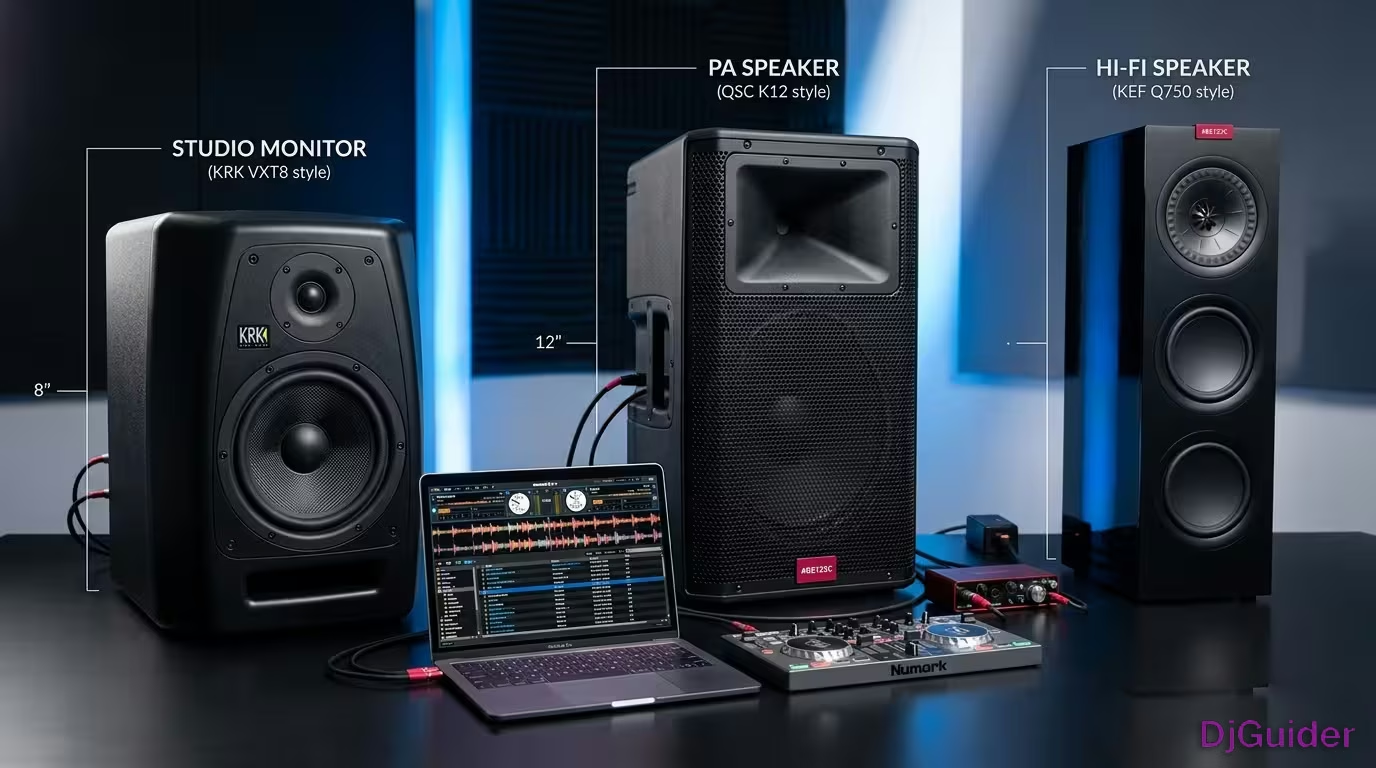
Hi-fi speakers are designed for a domestic environment. They are usually passive, meaning they don't have an amplifier built in. You'll need to buy a separate amplifier. If that amplifier is an analog amplifier — one without clever digital processing — it is guaranteed to be free of latency and therefore suitable for DJing.
A lot of hi-fi amplifiers, especially some of the cheapest ones that sound good, definitely are analog amplifiers.
Only use hi-fi speakers at home. They are not designed to be pushed to high volume in public. DJ gear can push frequencies through speakers that you don't get on a finished audio source — including massive bursts of sub-bass from effects. You can literally rip the cones and blow the tweeters. Never go into the red and never drive them too hard.
Used with respect, hi-fi speakers that you maybe buy for other reasons as well can be a really good choice for your DJ gear.
Near Field Studio Monitors
Near field monitors are the most obvious choice for practicing at home if you're getting serious about DJing.
They look like hi-fi speakers but are fundamentally different. They tend to have amplifiers built in — you don't need a separate amp. At higher price points, each speaker has its own power supply and built-in amplifier, with one cable going from the left output of your DJ gear to the left speaker, and one cable from the right output to the right speaker.
You can get these speakers from around $150 each, so $300 for a pair. They go up into four or five figures, but the concept is exactly the same across those price ranges.
They have a very truthful, flat frequency response. They're not making the sound sound better than it really is. They're telling the truth about your audio. That makes them a good choice if you want to be a DJ-producer, because the same speakers can be used for both use cases.
Near field monitors have a very truthful, flat frequency response. They're not making the sound sound better than it really is. They're telling the truth about your audio. From around $150 each ($300/pair), they're the best investment for serious home practice.
Note: Near field monitors are designed for controlled environments — a home studio where you're practicing — not for parties. The exception is some DJs who take one with them to a bar or lounge as a booth monitor, pointing it at themselves right next to their DJ gear.
You can also optionally add a subwoofer — the third speaker that sits on the floor and gives you the bass. Some of the consumer-level near field monitors also have Bluetooth built in so you can stream music from your phone, and extra inputs so you don't have to lean around the back every time you want to switch sources.
PA Speakers for Public Gigs
PA speakers are designed from the very beginning to be used away from the home.
PA speakers are very rugged. They're designed to be thrown around. They've got grills on that you could kick as hard as you can and they won't break. They are ugly. If you live with anyone who's not a DJ and you put a pair of these in your living room, the chances are quite high they will say "get those out of my living room instantly."
They usually sound best at a distance, and quite harsh when you're listening very close. Having one either side of you in a small practice studio at home is really far from ideal.
A typical mobile DJ setup uses two subwoofers on the floor, each with a pole coming out, and PA speakers on top — a four-speaker setup that sounds absolutely awesome in public. Some PA speakers now come with rechargeable batteries, which is useful if you're a mobile DJ playing outdoors and don't want to find mains power.
Wireless PA Options Without Latency
We've already established that Bluetooth introduces latency and is useless for DJing. But there are wireless systems that don't have that problem:
- SKAR audio wireless systems
- Alphatheta Sonic Link
So if you want battery-rechargeable speakers but Bluetooth won't work for you, look at smaller PA speakers that have these technologies built in.
Column Array Speakers — A Versatile Option
Column array speakers actually sound really nice close up as well as at a distance.
Bose with their L1 came out with this kind of speaker early on, and a lot of other companies make them now. There's a box that sits on the floor with a pole coming out of it, and the pole has lots of little speakers in. These are interesting because they sound really nice close up.
If you are looking for an all-round speaker setup that you could use at home for practice and at small venues, it might be worth looking into column array speakers. They could give you a little bit of the best of both worlds. Some of the smaller ones are rechargeable battery models too.
Column array speakers like the Bose L1 sound really nice close up as well as at a distance. If you're looking for an all-round speaker setup that you could use at home for practice and at small venues, they might be worth looking into.
Final Tips for Choosing DJ Speakers
There is no perfect DJ speaker setup — the times and places you want to DJ are too varied for one solution to cover everything.
Speakers that look good and sound fine in your living room are only going to be good enough for 20 or 30 people, not for 200 or 300. Most DJs who get serious will end up with at least one set that works well at home and possibly a separate set to take out with them.
A lot of DJs rent speakers when they play out, especially if you only play out two or three times a year. The good thing is that a hire company will probably bring them, set them up, and come and take them away at the end.
Avoiding Latency Is Non-Negotiable
Avoiding latency is the big thing. That is a non-negotiable. Hopefully that's come across clearly here.
Positioning Is Everything
Your speakers have to be very close to your head. The reason DJs have speakers is to hear properly what they're doing and to pair those speakers with their headphones to beat mix.
If you haven't got speakers set up properly that sound good and are close to you, then you're not going to be able to do what's necessary to beat mix. The traditional way is to have your monitor speakers and your headphones and adjust the volume on both, so you get a soundscape around you that gives you a really good feel for what the audience would be hearing. In order to do that, your speakers have to be set up near to you.
You Don't Need to Buy Something Special at First
Look in your attic, under your stairs, or in your cellar. You almost certainly have something you can push into play early on. You might have an old set of hi-fi speakers. You might have some old computer gaming speakers. You might be lucky and have an older Bluetooth speaker with a line-in socket that hasn't got all the modern multi-room stuff and actually works okay.
If you are going to go and buy something, do consider DJ gear with built-in speakers for practice — especially if this is a casual or semi-casual thing for you. It's very, very convenient.
And if it's time to spend serious money, you have to make the decision between buying something multi-purpose like hi-fi speakers, or going all in on proper near field DJ-producer monitor speakers.
Look in your attic, under your stairs, or in your cellar. You almost certainly have something you can push into play early on. You might have an old set of hi-fi speakers or some old computer gaming speakers. You don't need to buy something special at first.
On "DJ monitors" vs "producer monitors": The truth is branding. Honestly, they're usually interchangeable. They're usually made by the same company, around the same price, just branded and sold slightly differently. It's not something to worry too much about. Listen to speakers before you buy them if you can, or buy from somewhere with a return policy.
Speaker Types for DJing — Summary Comparison
| Speaker Type | Key Notes | Best For |
|---|---|---|
| Bluetooth speakers | Latency makes them unsuitable; even wired inputs usually fail due to digital processing | Not suitable for DJing |
| MiniRig Bluetooth speakers | Zero latency on line-in; rare exception to the Bluetooth rule | Practice at home |
| Home cinema / soundbars | May work depending on inputs; no guarantee; requires experimentation | Possibly home practice |
| Laptop built-in speakers | No latency; very quiet; use DJ software's "laptop speakers" setting | Temporary stop-gap |
| Gaming / computer speakers | Good value from ~$40; check for latency; return policy recommended | Budget home practice |
| DJ gear with built-in speakers | Numark Mixstream Pro, Denon DJ Live 4 / Live 2; very convenient | Casual home practice |
| Hi-fi speakers + analog amp | Passive speakers need analog amp; zero latency; home use only; handle with care | Home practice |
| Near field studio monitors | From ~$150 each; flat response; truthful audio; home studio use | Serious home practice and production |
| PA speakers | Rugged; loud; sounds best at distance; ugly; not for home | Public gigs |
| Column array speakers | Sound good close up and at distance; some battery-powered | Home practice and small venues |