Table of Contents▼
In This Article
- Essential Cables You Need
- The Screens: The Main Event
- Three Screens, Three Purposes
- Differences from the NS7II
- Audio Circuitry
- Class-Compliant with Mac
- Serato DVS Capability
- Front I/O Ports
- Back I/O Ports
- Build and Controls
- Motorized Platters
- Akai MPC Performance Pads
- EQ and Mixer Section
- Pitch Slider
- Strip Search
- NS7III Screens — Deep Dive
- Center Screen — Library Navigation
- Side Screens — Deck Information
- Summary
- Pros
- Cons
- Conclusion
The Numark NS7III takes an already excellent controller and adds three gorgeous built-in screens for a truly laptop-free performance experience. This review covers:
- Three Screens: Dedicated library navigation + dual deck waveform displays
- Build & Design: Lighter than the NS7II while maintaining all-metal construction
- Audio Improvements: Upgraded internal circuitry for better sound quality
- Motorized Platters: High-torque direct-drive with real vinyl and slip mats
- Akai MPC Pads: 16 RGB-backlit performance pads for cues, loops, and samples
- Serato DVS: Compatibility for adding external turntables with timecode
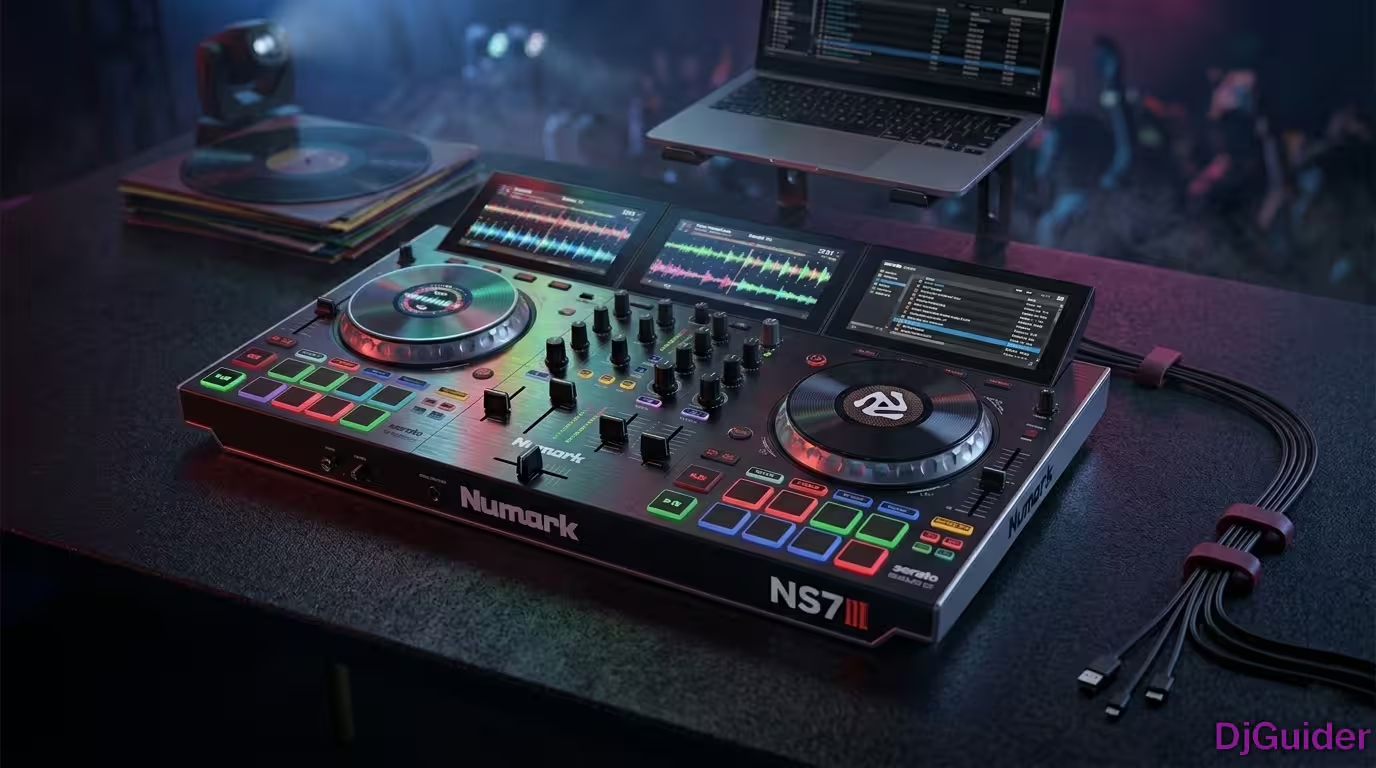
This post is a detailed review of the Numark NS7III Professional DJ controller. If this looks familiar to you, it really should — because it's almost the same controller as the previously released Numark NS7II, except you'll notice they have three beautiful screens mounted to the top region.
| Spec | Detail |
|---|---|
| Dimensions | 29.7" x 18.2" x 4.8" |
| Weight | 31.57 lbs |
| Channels | 4-channel |
| Software | Serato DJ |
| Skill Level | Advanced |
| Price | $1,200 |
Essential Cables You Need
- Numark Pro Gooseneck Light
- Monoprice 1.5ft Premium 2 RCA Plug
- Premium USB 2.0 Cable
- C2G Replacement Power Cable
- Phonograph Turntable Ground Wire
- Numark RS45TFS Replacement FaderStart Crossfader
The Screens: The Main Event
The screens on the NS7III are designed to give you a nice view of the Serato DJ software — the different wave points, cue points, and all types of other information such as your library and track information. That way you don't have to look at your library screen or computer as much as you normally would.
These screens are here to assist you in focusing on your main performance. And they are also offered as an add-on for the NS7II.
If you have a Numark NS7II and wish you bought the NS7III, you don't have to worry — Numark offers the screens as a separate add-on for the NS7II.
Three Screens, Three Purposes
| Screen | Function |
|---|---|
| Left Screen | Deck 1/3 waveform, cue points, track info, EQ visualization |
| Center Screen | File navigation, library browsing, crates, playlists |
| Right Screen | Deck 2/4 waveform, cue points, track info, EQ visualization |
The middle screen is dedicated to your library navigation functions while the screens on the sides are dedicated to your deck functions. You can press a view button to change the middle screen to a horizontal waveform showing a side-by-side view of two tracks.
Differences from the NS7II
Beyond the screens, there are several other differences:
| Feature | NS7II | NS7III |
|---|---|---|
| Weight | 33.07 lbs | 31.57 lbs (1.5 lbs lighter) |
| Screens | None | Three built-in screens |
| MPC Pads | Gray | Blackened with RGB backlit rings |
| Audio Circuitry | Standard | Upgraded for better sound quality |
| Mac Compatibility | Driver required | Class-compliant (plug and play) |
| Serato DVS | No | Yes — compatible with external turntables |
The NS7III shaved 1.5 pounds even with the screens added. They used different materials in the workmanship, but it's still completely solid — metal all the way around. It gives you the confidence that you're using a truly professional digital DJ controller.
Audio Circuitry
Another difference between the NS7II and NS7III is the changed internal audio circuitry, giving you slightly better sound quality with the NS7III. Both sound superb and deliver high-quality audio.
Class-Compliant with Mac
The NS7III is now completely class-compliant with Mac machines — no additional driver needed. Just plug it in and play. Windows users still need to download the driver as usual.
Serato DVS Capability
The NS7III also allows you to plug external turntables into the rear inputs. As long as you purchase the Serato DVS expansion pack, you'll be able to use this with external turntables and timecode, and the screens will show the different decks as well.
Front I/O Ports
| Feature | Location | Details |
|---|---|---|
| Mic 1 Input | Front left | Combo XLR/TRS input |
| Mic Controls | Front left | Gain, Bass, Treble, On/Off switch |
| A/B Switches | Front center | Assign channels to crossfader sides A or B |
| Crossfader Contour | Front center | Adjusts crossfader curve |
| Headphone Outputs | Front right | Mini and 1/4" jacks |
| Headphone Controls | Front right | Volume, blend (master/cue), split cue on/off |
The crossfader is really nice and loose — perfect for scratching and also perfect for blending. Very professional, it feels like there's a lot of metal inside.
Back I/O Ports
| Port | Function |
|---|---|
| Motor Torque Switch | High/Low torque for platter motors |
| Phono Grounds | Eliminate hum from turntables |
| Mic 2 Input | Combo TRS/XLR on the rear |
| 4x Line Inputs | All four channels for standalone mixer use |
| Line/Phono Switch | Channels 1 & 2 can switch to phono for turntables without preamp |
| Screen Attachment | Power and USB dongle for the screens |
| Additional USB Port | Extra USB connection |
| Balanced Master XLR | Left and right XLR master outputs |
| Master RCA Output | Unbalanced master output |
| Booth RCA Output | Booth monitoring output |
| Power Cable | IEC power inlet with on/off toggle |
Build and Controls
Motorized Platters
For each deck, you have an actively spinning platter with real vinyl and a real felt slip mat underneath. The high-torque direct-drive motor lets you control start time and stop time for different effects with vinyl braking.
| Platter Feature | Function |
|---|---|
| High-torque motor | Responsive and realistic vinyl feel |
| Start/Stop time control | Adjustable for vinyl brake effects |
| Bleep and Reverse | Momentary or permanent reverse spin |
| Slip mode / Motor off | Changes from scratch to jog wheel pitch bending |
| Real vinyl + slip mat | Closest feel to actual turntables |
Akai MPC Performance Pads
You have 16 RGB backlit pads (blackened instead of the NS7II's gray) that control:
- Hot cues
- Auto loops
- Auto roll loops
- Sampler
- Slicer
The pads correspond to the colors on the screen, so you can see at a glance which cue point is which.
EQ and Mixer Section
| Control | Details |
|---|---|
| Source selection | Line inputs, PC (Serato), Mic 2 per channel |
| Hardware filters | Low-pass and high-pass (digital files only) |
| EQ | Bass, Mid, Treble knobs per channel |
| Gain | Per-channel gain control |
| LED meters | Full strip meters for volume levels |
| FX assign | On/off per channel for FX section A or B |
| BPM meter | See if tracks are in sync at a glance |
Pitch Slider
Long, sturdy feeling pitch slider with a center light indicator. It's not a sender click, so you can use the entire frequency band for tempo control.
Strip Search
A strip search function at the top lets you jump to anywhere in your track quickly.
NS7III Screens — Deep Dive
The really big story on the Numark NS7III is the big screens mounted to the top of the controller. They allow you to see many of the different functions and features within Serato DJ without actually looking at your laptop.
Center Screen — Library Navigation
The middle screen is dedicated to file navigation. You can browse through crates, prepares, and files, and navigate your music collection.
| Feature | Details |
|---|---|
| Track list | Sort by artist, BPM, or track name |
| BPM display | Shows BPM of each track |
| View button | Toggles to horizontal waveform overlay |
| Back/Forward | Navigate through crates and playlists |
There are times in a gig where you may want to use the keyboard to search for tracks, and you're not able to do that on the screen. You'll have to pull out your laptop for typing. However, if you organize your music well into crates and playlists, you can minimize this.
Side Screens — Deck Information
| Information | Details |
|---|---|
| Timeline | Long timeline showing position in track |
| Cue points | Colored to match the RGB pads on the controller |
| Waveform | Large waveform view |
| Track info | Track name, artist, key, BPM |
| Loop/roll timing | Shows where you are in loop rolls |
| EQ visualization | See EQ levels at a glance |
| Needle indicator | Press view to show needle position |
| Pad functions | View current slicer/sampler assignments |
The screens allowed me to take my attention away from the laptop and focus it on the controller during the performance. That alone is a game-changer for live sets.
Summary
All in all, the screens are a really cool and functional addition to the Numark NS7III. It definitely allowed me to take my attention away from the laptop and focus it on the controller during the performance.
Pros
| Pro | Why It Matters |
|---|---|
| Motorized platters | Closest you can get to vinyl DJing on a controller |
| Three built-in screens | See waveforms, cues, and library without looking at laptop |
| Sturdy build | Metal construction, durable and professional |
| Full Serato DJ bundle | All software included out of the box |
| High-torque platters | Real vinyl with slip mats for authentic feel |
| Akai Pro 16 pads | RGB backlit, touch-responsive, great feel |
| Touch-sensitive EQ/FX | Fun and easy to manipulate |
| Standalone mixer | 4-channel with assignable microphone |
| Serato DVS compatible | Add two external turntables |
Cons
| Con | Explanation |
|---|---|
| Heavy and bulky | 31.57 lbs — though still lighter than turntables + mixer |
| Filters limited to digital | Low/high-pass filters don't work with external inputs |
| Still need laptop sometimes | Keyboard search and some features not available on screens |
| No EQ waveform feedback | Screens don't show EQ kill visual indicators on waveforms |
Conclusion
The Numark NS7III DJ controller is definitely by far my new favorite digital controller. The reason being is that it has these actively spinning platters which really harken back to original vinyl DJ ways, and these new gorgeous three screens built right in at the top.
You also have the ultra-high torque actively spinning platters with real vinyl and slip mats — you can't really get any closer to vinyl DJing than this on a controller.
The authentic Akai Pro 16 performance pads feel really good to drum with, and the RGB backlit rings let you see at a glance exactly what all your cue points are for.
Even with the minor gripes, it's the most fun I've ever had on a DJ controller. The screens are an excellent addition to the already proven tried-and-true Numark NS7II.