
Table of Contents▼
In This Article
- Key Features
- Build Quality
- Setup
- Jog Wheel Calibration
- Inputs and Outputs
- Back Connections
- Front Connections
- Front Panel Controls
- Headphone Output
- Crossfader Performance
- Line Faders
- Effects
- Browse and Library
- Jog Wheels
- Touch Needle Strip
- Needle Indicator Issue
- Play/Pause and Cue
- Performance Pads
- 4-Channel Layering
- DVS Compatibility
- Pros and Cons
- Comparison: Mixars Primo vs Pioneer DDJ-SR2
- Conclusion
- What It Does Well
- What Could Be Better
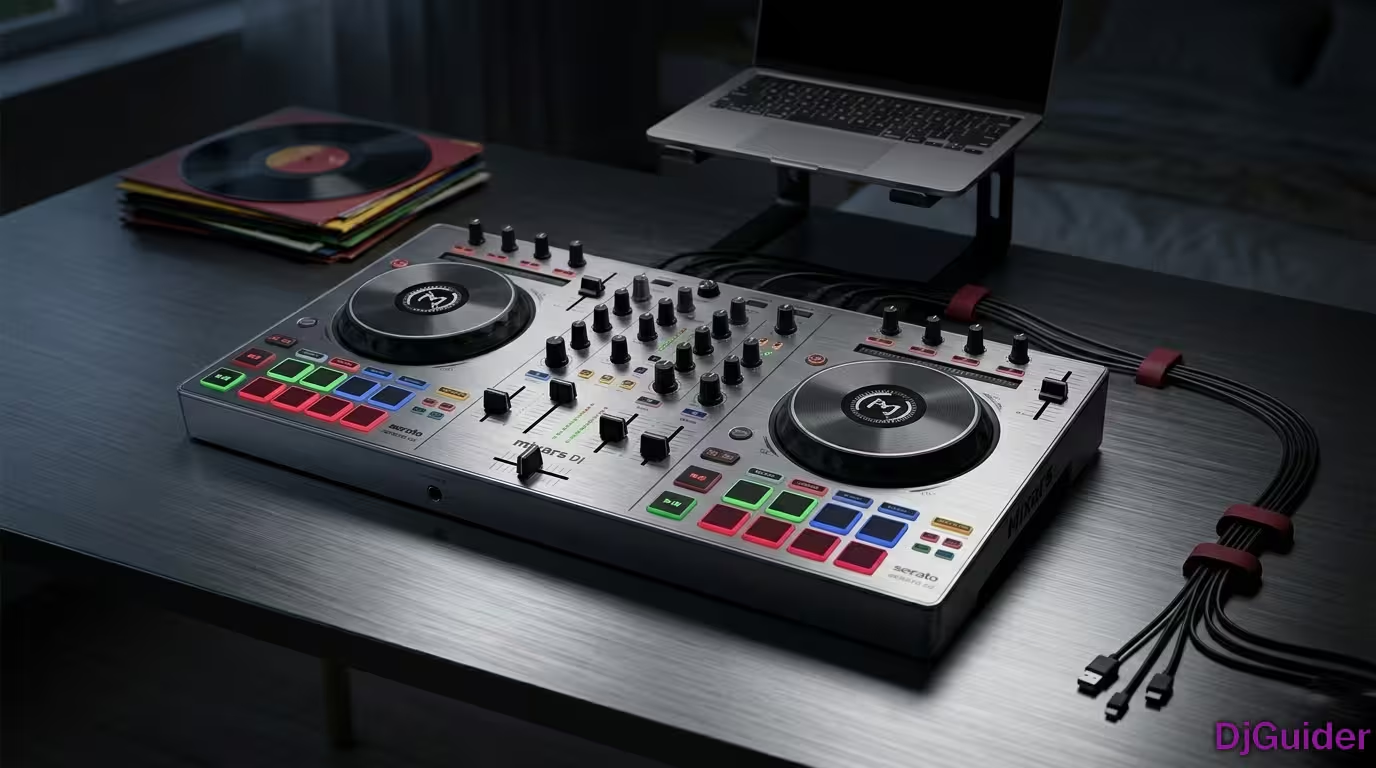
The Mixars Primo is a solid 2-channel Serato DJ controller with excellent build quality and a compact footprint. This review covers:
- Build Quality: Mostly metal body, brushed aluminum faceplate, sturdy construction
- Key Features: 16 RGB pads, large aluminum jog wheels with on-jog display, 100mm pitch control
- Standalone Mixer: Works without a computer for backup or mobile use
- Downsides: Long crossfader cut-in, stiff jog wheel tension, required calibration out of the box
- Verdict: Great for mix DJs, less ideal for scratch-focused performers
This is a detailed review of the brand new Mixars Primo, 2-channel Serato DJ controller. Mixars has been coming out with really cool DJ gear for the last four or five years — they've produced really good DJ mixers and high-quality turntables.
But this is the new Mixars Primo, the newest DJ controller Mixars has out right now. They've been teasing this since about NAMM 2017 — we finally heard about it, heard nothing for a while, and now it's finally released.
Key Features
| Feature | Details |
|---|---|
| Channels | 2-channel for Serato DJ (4 decks layered) |
| Build | Sturdy with brushed aluminum faceplate |
| Sound card | Built-in for simple USB connectivity |
| Pitch control | 100mm pitch slider |
| Power | USB powered |
| Jog wheels | Large aluminum with on-jog display and LED ring |
| Performance pads | 16 RGB pads |
| Crossfader | Curve adjustment & reverse |
| Inputs | Combo Mic (XLR/TRS), Aux RCA |
| Headphone outs | Two (1/4" and mini) |
| Software | Plug and play with Serato DJ |
Build Quality
First, let's touch on the build quality. Like most of Mixars' gear, this is a mostly metal body — the top face is all metal, the back panel is metal, and the front panel is metal. There is some plastic along the sides and bottom, and there are cutouts in the bottom so you can grab it.
| Aspect | Quality |
|---|---|
| Top face | Brushed aluminum |
| Back panel | Metal |
| Front panel | Metal |
| Sides/bottom | Plastic with cutouts |
| Jog wheels | Metal top |
| Pads | Rubberized, solid feel |
| Faders | Not cheap or plastic |
| Overall feel | Solid, well-built, built to last |
Everything feels really solid, well built, and well made — like all other Mixars products.
The Mixars Primo has one of the best build qualities in its class. The metal construction is a significant upgrade over the all-plastic bodies you'll find on many competing controllers at this price point.
Setup
The setup is pretty easy. If you have Windows or Mac, download the latest drivers and firmware from the Mixars website, then download the latest Serato DJ software. Install everything and you're ready to play.
Jog Wheel Calibration
I had to do one thing I've never had to do with any other controller — calibrating the jog wheels. When I first set it up, every time I hit play and touched the jog wheel, the music would stop. I had to contact Mixars and they told me a jog wheel calibration was needed for some units.
How to Do Jog Wheel Calibration
- Make sure your Mixars Primo is switched off via the power switch at the back.
- Press and hold the buttons NOISE + FILTER, then switch on your device while holding the buttons.
- Press the left deck VINYL button to switch between auto-calibration and manual calibration.
Auto Calibration:
- Both jog wheels are calibrated together
- Do not touch the jog wheels during calibration
- Press SHIFT to save
Manual Calibration:
- Calibrate each jog wheel separately
- Move the pitch fader of the side under calibration — sensitivity increases from bottom (min) to top (max)
- Touch the jog wheel to test sensitivity (logo LED turns on when touch is sensed)
- Adjust pitch slider for desired sensitivity
- Repeat for the other deck
- Press SHIFT to save
This was one of the first DJ controllers I've ever had to calibrate the jog wheels on right out of the box. If you buy one and the jog wheels stop the music, this calibration process will fix it.
Inputs and Outputs
Back Connections
| Port | Type |
|---|---|
| Master output | XLR balanced |
| Booth output | TRS 1/4" |
| Master RCA | Unbalanced |
| Channel 1 input | RCA (Line/Phono switchable) |
| Channel 2 input | RCA (Line/Phono switchable) |
| Mic input | Combo XLR / 1/4" |
| USB port | USB-B |
| Power | DC-in + toggle switch |
Front Connections
| Feature | Details |
|---|---|
| Mic/AUX switch | Toggle between mic and auxiliary input |
| Aux RCA input | Front-mounted, works without Serato (backup source) |
| Mic/AUX volume | Dedicated volume knob |
| Tone control | For microphone |
| Mic echo knob | Add echo to microphone |
| Crossfader reverse | On/Off toggle |
| Crossfader curve | Adjustable knob |
| Cue/Master blend | Headphone monitoring blend |
| Headphone jacks | 1/4" and mini |
| Split cue | On/Off button |
| Headphone level | Volume control |
The front auxiliary RCA input is perfect for backup scenarios. If your laptop crashes mid-gig, you can plug your phone directly into the aux port and keep music playing — it works independently of Serato. This is a huge plus for mobile DJs.
Front Panel Controls
The Mixars Primo is actually 4-channel capable — deck 3 and deck 4 are layered in with switches at the top right. Deck 1 can switch to deck 3, and deck 2 can switch to deck 4.
However, it's easier to use this as a 2-channel controller. If you really want to use four decks, this works best in a 2-channel configuration.
Headphone Output
One thing to note: the headphone output is very strong and very loud. It's going to work well in those really loud DJ environments where you need to monitor your mix. It's definitely going to do the job.
Crossfader Performance
| Aspect | Rating |
|---|---|
| Cut-in distance | ~5mm — very long |
| Sharpest curve | Still has significant dead space |
| Scratching | Not ideal for hard cuts |
| Mixing | Serviceable |
| Overall | Below average for this class |
The crossfaders feel pretty good, but the feel is kind of deceptive because this has a rather long 5mm cut-in distance. You can move the fader quite a bit before the sound cuts out. Even on the hardest curve setting, there's still a lot of dead space.
Long cut-in distance is a no-no for crossfaders, so it makes it a little bit useless for most super hard cuts. Take it for what it is — this controller doesn't have one of the better crossfaders.
If you're a mix DJ who focuses on smooth transitions and blends, the crossfader won't bother you. But if scratching and turntablism are your focus, the long cut-in distance will be frustrating.
Line Faders
The line faders are much stiffer than the crossfader and work exactly as they should.
Effects
The effects section sits in the middle — sound color effects including noise, filter, echo, and crush. They all work really nicely and they're all post-fader effects.
| Effect | Description |
|---|---|
| Noise | Adds noise/broadcast effect |
| Filter | Low-pass/high-pass sweep |
| Echo | Rhythmic delay repeats |
| Crush | Bit-crushing/distortion |
You also have your FX1 and FX2 sections at the top of the controller with three traditional controls for your effects. The beat knob lets you select different effects within Serato DJ. You can use multi-effects or single effects, and they are post-crossfader and post-line fader.
Browse and Library
| Control | Function |
|---|---|
| Browse knob | Oversized, rubberized, clicky |
| Shift + Browse | Navigate through folders and playlists |
| Load button | Load selected track |
| Jog wheel ring | Visual feedback when loading |
Jog Wheels
| Aspect | Rating |
|---|---|
| Tension | Too stiff for my liking |
| Accuracy | Very accurate |
| Spinbacks | Only 2-3 rotations |
| Vinyl mode | Yes |
| Needle indicator | Only works in last 20 seconds |
The jog wheels themselves are pretty good but have rather stiff tension. I really wish they had a lot less tension and were more slippery. When I do a spinback, the wheel spins back maybe 2 or 3 turns. On a CDJ with a lighter feel, you get good spinbacks on one rotation. I can't do that here.
The tightness means it's more geared toward mixing as opposed to scratching, but they are very accurate. You'll get all the right sounds you're supposed to get.
Touch Needle Strip
The touch needle strip allows you to skip forward or backward within the track. You also have a Censor/Reverse button — hold it to momentarily censor any part of the song, or press Shift + Censor for the whole track to play in reverse.
Needle Indicator Issue
The only time you see a needle indicator on the jog wheel is in the last 20 seconds of your track. I would like to see that needle indicator working throughout the whole track — hopefully a firmware update will address this.
Play/Pause and Cue
These are hard plastic with what feels like brushed aluminum paint. They're very responsive and feel good, even though they're pretty small.
Performance Pads
| Pad Mode | Function |
|---|---|
| Hot Cue | Trigger cue points |
| Roll | Loop roll |
| Slicer | Slice through the track |
| Sampler | Trigger samples |
| Pitch Play | Play notes/pitches |
The pads are very responsive rubberized pads. They don't have a click to them, but they have a good amount of give — they feel really good to drum and play with.
4-Channel Layering
| Switch Position | Deck Assignment |
|---|---|
| Normal | Deck 1 (left), Deck 2 (right) |
| Layered | Deck 3 (left), Deck 4 (right) |
DVS Compatibility
Both channels are Serato DVS compatible, meaning you can use timecode control with turntables connected to the rear inputs. You just need to upgrade to the Serato DVS expansion pack.
Pros and Cons
| Pros | Cons |
|---|---|
| Sturdy metal build quality | Long crossfader cut-in distance |
| Compact footprint, easy to transport | Stiff jog wheel tension |
| Full Serato DJ Pro bundled | Required jog wheel calibration out of box |
| Standalone mixer mode | Needle indicator only in last 20 seconds |
| Front aux input (works without computer) | |
| All pad modes including Pitch Play | |
| Very loud headphone output | |
| DVS compatible |
Comparison: Mixars Primo vs Pioneer DDJ-SR2
| Feature | Mixars Primo | Pioneer DDJ-SR2 |
|---|---|---|
| Build | Metal top, front, back | Mostly plastic |
| Crossfader | Long cut-in (5mm) | Shorter, more scratch-friendly |
| Jog wheels | Stiff tension | Lighter tension |
| Headphone out | Very loud | Standard |
| Size | Compact | Similar |
| Software | Serato DJ Pro | Serato DJ Pro |
| Standalone mixer | Yes | No |
I think I like the DDJ-SR2 a little bit better than the Mixars Primo overall. But the Primo has better build quality with its metal construction, and the standalone mixer mode is a significant advantage for mobile DJs.
Conclusion
The new Mixars Primo 2-channel Serato DJ controller is a pretty good controller overall. If you're a Serato DJ user, there's not too much else in the 2-channel market that's current today.
What It Does Well
- Build quality — Metal construction throughout, feels premium
- Compact size — Easy to transport, fits in cramped DJ booths
- Full Serato DJ Pro — Bundled with all the software you need
- Standalone mixer mode — Use it without a computer
- DVS compatibility — Add turntables with the DVS pack
What Could Be Better
- Crossfader — The long cut-in distance makes scratching difficult
- Jog wheels — Too much tension for my liking
- Calibration — Having to calibrate out of the box is unusual
All in all, it's still a cool controller for Serato DJ. It's nice and compact, very well made, and will definitely suit the bill for DJs who don't care about having a super-slippery jog wheel or a short cut-in fader. For mixing DJs, this might be the perfect Serato DJ solution.